



September 12, 2023, 6:05 pm | Read time: 8 minutes
On Tuesday evening, Apple unveiled the iPhone 15. Now, iOS 17 is finally officially available for download.
Apple had already announced iOS 17 at the developer conference WWDC in June. TECHBOOK has tested the new version of the iPhone operating system in advance and summarizes the best new features.
Overview
- New Lock Screen Turns iPhone into Smart Home Display
- Three Core Functions Get Major Upgrade with iOS 17
- New Features for AirDrop
- Mood Tracker in the Health App
- iOS 17 Gets New Journal App
- CarPlay Takes Over Car Functions
- Health App Comes to iPad
- Also New in iOS 17
- Unclear if Sideloading Comes to iOS 17
- These iPhones Get the Update to iOS 17
New Lock Screen Turns iPhone into Smart Home Display
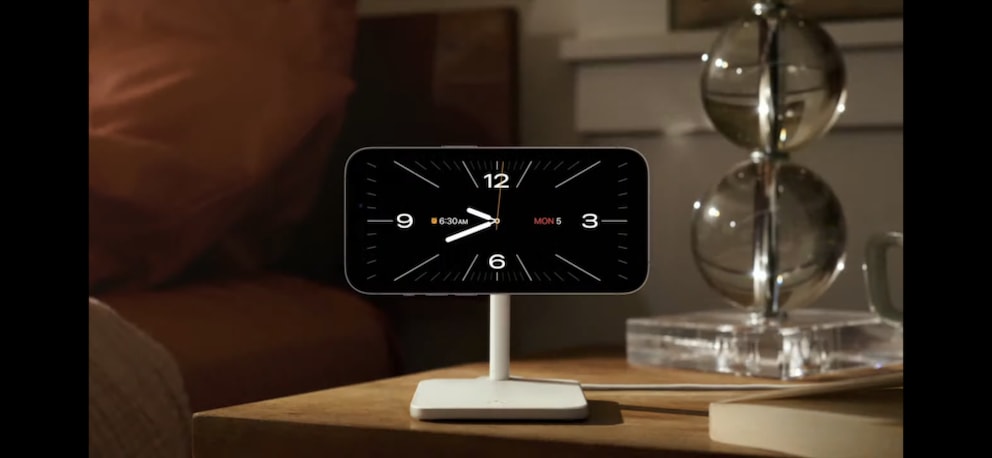
Apple has introduced a new interface for the iPhone lock screen. Until now, information was displayed there only to a limited extent. However, the restructuring turns the iPhone into a kind of smart home display. In the locked state and in a horizontal position, widgets for weather, calendar appointments, and notifications appear.
Apple calls the feature StandBy and aims to make the iPhone more practical for information at a distance–such as on a nightstand. The screen adjusts for sleeping accordingly. This happens through dimming and switching to a reddish hue. The lock screen is customizable with different clock types, and you can swipe to see a photo slideshow. The widgets are stacked in “Smart Stacks” like on the iPhone and are intended to show the right information at the right time, such as a reminder for a meeting.
Google has already integrated a similar feature into its Pixel smartphones. With the “Overview” feature, the devices display information like timers, fitness, weather, appointments, and more on the lock screen. Amazon’s Fire Tablets also have a “Show Mode,” which allows the devices to transform into smart displays similar to the Echo Show.
Three Core Functions Get Major Upgrade with iOS 17
Three of the iPhone’s core functions–Phone, FaceTime, and iMessage–are getting a whole package of new features.
Phone
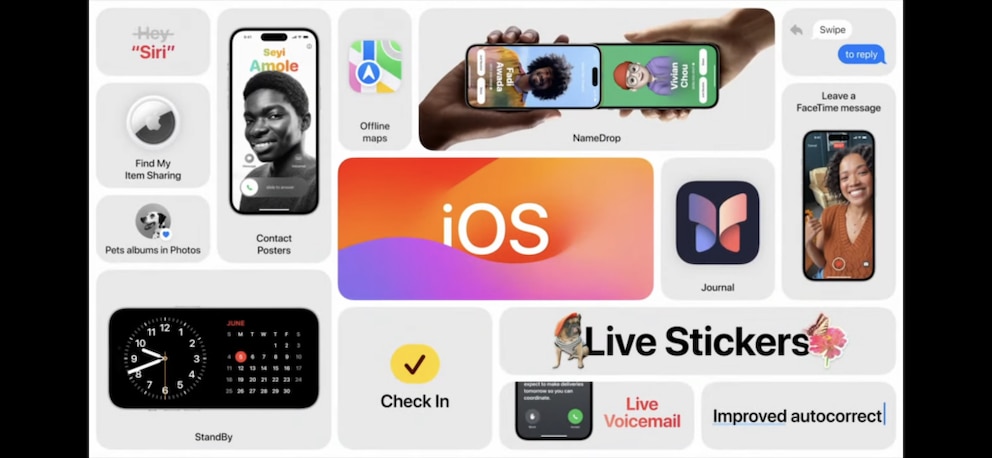
With iOS 17, Apple introduces so-called Contact Posters that appear during calls. Users can set a photo or Memoji of themselves, and the system suggests matching styles for the name–similar to the customizable lock screen. This makes it easier to recognize callers. Additionally, the contact cards also appear when searching for contacts.
Also new is Live Voicemail, which transcribes voicemails in real-time, for instance, when you can’t take a call. If the call is important, you can read it on the screen.
FaceTime
In addition to the same contact cards and posters, FaceTime gets a video message feature. If someone is unavailable, you can leave them such a video message.
iMessage
SMS, iMessage, and all other messaging apps get a completely new sticker system. In a new section, all stickers, Memojis, and emojis are combined. You can now turn your own photos and emojis into stickers–in any size. For photos, simply hold down to cut out a subject from the image and save it as a sticker. Live Photos can even become animated stickers. Stickers can be applied as usual or as reactions to messages via drag-and-drop.
Additionally, iMessage gets new search filters like additional search terms for narrowing down. Messages can now be replied to directly with a swipe gesture, and audio messages can be transcribed into text.
New Features for AirDrop
When AirDrop works, it’s like magic–a click is all it takes to send anything wirelessly. What AirDrop couldn’t do until now is easily share numbers. But with NameDrop, that changes: hold iPhones together, the contact cards pop up, share–done. This even works with the Apple Watch.
For photos and other media, it’s now enough to bring two iPhones together. Even better: if you start transferring large files–such as videos–and move out of AirDrop range, the transfer now simply continues over the internet.
Mood Tracker in the Health App
With iOS 17, the Health App gets a new mood tracker. Users can record their mood by answering questions about their day. The results can then be evaluated in a chart. According to Bloomberg, Apple plans to automatically determine mood in future versions of this feature by analyzing speech, typed words, and other metrics. The standardized mood query is even supposed to detect depression risk and refer to professional help in serious cases.
Another new feature coming to the Health App is the management of vision impairments like myopia. Apple devices with depth recognition, including iPhones and iPads with Face ID, also warn when held too close to the eyes.
Read also: Everything about Apple’s iPhone 15
iOS 17 Gets New Journal App
Independent of the Health App, but still intended to improve mental health, is the new Journal App. It can evaluate data on the iPhone to determine what a typical day for the user looks like. If desired, the app can suggest things to journal about. The app has access to contacts, location, music, workouts, and more. Based on this data, it can recognize when behavior is outside the normal routine.
CarPlay Takes Over Car Functions
Apple CarPlay is set to receive a major update, allowing the interface to take over only car functions like volume control and radio management. CarPlay is also expected to run on multiple displays simultaneously, appearing on the dashboard as well.
Health App Comes to iPad
The Health App, with its numerous health features, has so far been available only for the iPhone. With iPadOS 17, Apple could make the app accessible for iPads for the first time. The larger screen of the tablets would be better suited to display metrics like ECG curves and medication overviews.
Read also: Apple introduces new MacBook Air and Mac Pro
Also New in iOS 17
- Instead of “Hey Siri,” just “Siri” is enough. Follow-up commands are also possible without saying “Siri” again.
- iOS 17 introduces offline maps to Apple Maps for the first time.
- The Photos App now recognizes pets in addition to people in pictures.
- Autocorrect receives numerous improvements to simplify text prediction and undo.

These iPhones Will No Longer Receive iOS 17 Updates
The iPhone Now Gets These New Features
Unclear if Sideloading Comes to iOS 17
Major changes in iOS 17 are expected due to the Digital Markets Act–an EU regulation that came into effect in October 2022. Until now, companies like Google and Apple have had exclusive control over their app stores. To offer an app for the iPhone, developers must use the Apple App Store and remit between 15 and 30 percent of their revenue to the company. Additionally, all browsers for the iPhone must be based on Apple’s WebKit engine. Even browsers like Google Chrome and Mozilla Firefox for the iPhone are therefore based on the same engine as Safari.
However, the Digital Markets Act makes both practices illegal. Specifically, this means that Apple must allow browsers based on other programs. But the even more significant change is that the company must allow so-called “sideloading” on the iPhone. This is the practice of installing apps from sources other than the App Store–as is already possible on Android smartphones. Not only could users then download apps directly from websites, but they might even install alternative app stores. The existing Apple App Store will, of course, remain available.
Apple did not mention sideloading in iOS 17 at the WWDC. Since the change might only affect Europe, the company may be planning a smaller-scale announcement.
These iPhones Get the Update to iOS 17
Apple typically supports its devices with new updates for quite a long time. However, not all iPhones that received iOS 16 will get the next upgrade to iOS 17. The iPhone 8 and 8 Plus, as well as the anniversary model iPhone X, are missing from the list. All other generations that are five years old or younger can look forward to the update to iOS 17 in the fall. This includes the iPhone XR, XS, and XS Max from 2018, as well as all models released afterward.
- iPhone 15
- iPhone 14, Plus, Pro, and Pro Max
- iPhone 13, Mini, Pro, Pro Max
- iPhone 12, Mini, Pro, Max
- iPhone 11, Pro, Max
- iPhone XR
- iPhone XS, XS Max
- iPhone SE (from the 2nd generation)
As for iPadOS 17, the counterpart to iOS 17 developed specifically for tablets, all models from 2017 that also received iPadOS 16 will get the update. The first generation of the iPad Pro is therefore no longer included.
- iPad Pro (from the 2nd generation of 2017)
- iPad Air (from the 3rd generation of 2019)
- iPad (from the 6th generation of 2018)
- iPad Mini (from the 5th generation of 2019)