


September 14, 2023, 10:59 am | Read time: 3 minutes
Back in June, DKB announced it would soon bid farewell to its current website and banking app. For months, both the new and old apps have been available simultaneously. But that’s coming to an end, as DKB will make the final switch in October.
With the June announcement to soon retire the old app, DKB also introduced its new website. The bank informed users via email about the updated web presence. Initially, not all features were available, so some customers were still directed to the old website. Since then, DKB has added many important features to the new browser view. On October 10, DKB will fully transition to the new app, aligning with the new website.
Overview
DKB Announces End for Old Banking App
Currently, when logging into the old DKB app (white icon with blue logo), users see a notice that “this app will no longer be supported as of October 10.” Instead, customers should switch to the new app, which features a blue icon with a white logo for easier distinction.
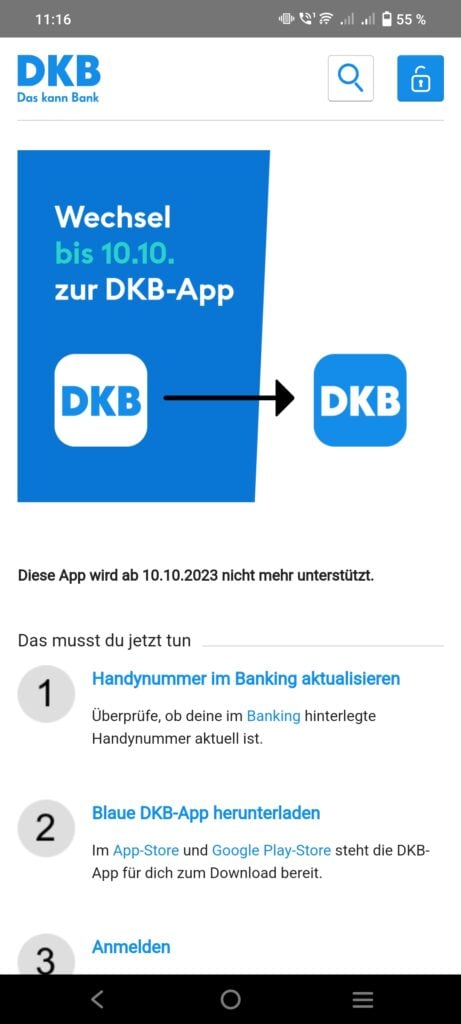
The new app has been in a sort of test phase, available alongside the old application for many months. DKB has regularly updated it with new features to ensure it can be used as comprehensively as the previous app. For example, the ability to manage standing orders through the new app was added just this summer.
The new app now offers nearly all essential banking functions. Unlike its predecessor, it was specifically developed for use on Android smartphones and iPhones. The previous app was not particularly visually appealing on mobile, as it primarily served as an entry point to the banking site. DKB has announced that the old app will be permanently discontinued on October 10, aiming to unify and simplify mobile banking for all users.
Also read: Activate Online Banking Access from Home

Cell Phone Switch and Online Banking–What DKB Customers Need to Know

DKB Revamps Online Banking–Users Must Take Action
What DKB Customers Need to Do Now
By October 10, DKB customers will need to switch to the new app. It can be downloaded for free on Android or iOS. Before installing the new DKB app, users should check and possibly update a setting. DKB’s help page advises that the mobile number stored in the banking system must be current. This can be verified in online banking under “Service” and “Personal Data.”
After installation, users can log in with their usual credentials. They will receive a code via SMS, which is needed for confirmation. Hence the need to verify the mobile number beforehand. Subsequently, login can also be confirmed using a PIN, fingerprint, or facial recognition as part of two-factor authentication.
What Happens to TAN2go After the Transition?
Transactions can be confirmed through the new banking system using the new app. The previously provided PIN, stored fingerprint, or facial recognition is sufficient. Entering a TAN is generally no longer necessary.
However, DKB notes that users may occasionally be redirected from the new banking system to the old one, such as when a feature is not yet available in the new app. In these cases, they will still need the TAN2go app to authorize transactions.