

June 16, 2024, 10:49 am | Read time: 7 minutes
Laptops often lack enough ports to connect the desired hardware. That’s when a docking station makes sense. However, there are now countless models available. TECHBOOK presents the best models for every need.
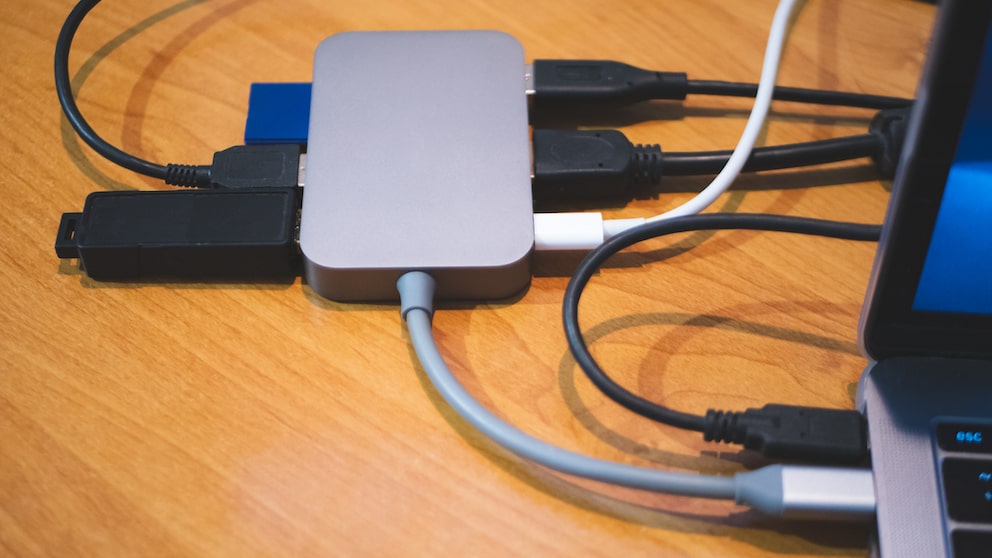
With a laptop, you’re almost ready to go anywhere, and with a stable internet connection, you’re also very flexible–whether for professional purposes or personal enjoyment. However, the necessary ports are often missing from the device to connect an external hard drive, an additional mouse, or a monitor. This is where the docking station comes into play. It allows you to quickly connect external devices like monitors, a mouse, a USB stick, and much more to the laptop. TECHBOOK has identified the best docking stations.
Overview
What is a docking station suitable for?
A laptop or MacBook is often not as flexible as it seems at first glance. Once you’re sitting at your desk in the office, you may notice that the laptop doesn’t have the right or enough ports to connect an external monitor, a mouse, a keyboard, and other devices. In such cases, docking stations can help. Once set up, you simply connect your Windows laptop or MacBook to the docking station in the office in the morning–and the device is instantly connected to all essential hardware components.
What You Should Consider When Buying a USB-C Cable

Sony Unveils First Official PlayStation Monitor
Which devices can I connect to a docking station?
The hardware you can connect to a docking station depends on the specific model and its ports. Generally, all peripheral devices that are typically used with desktop PCs can be connected to the laptop. These include the following devices:
- Monitor or projector
- Mouse and keyboard
- Printer
- Smartphones and digital cameras
- External hard drives and USB sticks
- LAN cables
- Memory cards
TECHBOOK presents eight recommended docking stations for every use, every need, and every user.
Lenovo 40AS0090EU
The handy and inconspicuous docking station from Lenovo is suitable for many devices. The model is actually designed for ThinkPad devices but can also be used with other laptops. In no time, the laptop can be connected to other peripheral devices. The docking station offers multiple connection options, including several USB ports, HDMI, Ethernet, etc.
Advantages:
- many ports
- supports multiple monitors
Disadvantages:
- actually designed for ThinkPad laptops
- a bit more expensive than other docking stations
Ugreen Revodok 206
Ugreen offers countless docking stations. The Revodok 206 model is particularly recommended for the following reasons: First, the docking station can be used with numerous devices, and second, it offers a variety of ports. Additionally, a fast-charging function is integrated, allowing devices to quickly gain battery power. The docking station is compatible with Windows, macOS, and Linux.
Advantages:
- relatively inexpensive
- fast-charging function (100 watts)
- compatible with multiple systems
- supports 4K output
Disadvantages:
- not as high-quality as other models
Icy Box 11-in-1
For optimal organization of devices, a docking station with many ports is recommended. The Icy Box model is undoubtedly one of the devices that offer a lot. Not only is the number of connection options a plus, but the design is also convincing. The docking station can be used with both Windows and Mac devices. It’s important to note that you must install the driver before use.
Advantages:
- robust construction
- aluminum housing
- compatible with Windows and Mac
- many ports
Disadvantages:
- not the cheapest model
- could be a bit heavier
- no USB-C
Anker PowerExpand+ 11-in-1
The Anker docking station is one of the most versatile models. It features eleven ports that make the workday easier and increase productivity. Additionally, multiple HDMI and USB interfaces are integrated. There is also an SD and a microSD card reader.
Advantages:
- very versatile
- many useful ports
- compact model
- 4K video output
Disadvantages:
- a bit more expensive
HP USB-C Docking Station G5
Versatile, elegant, and space-saving: The stylish and compact HP USB-C Docking Station G5 is a true all-rounder. It impresses not only with a variety of ports but also with maximum flexibility in terms of compatibility. It works with all USB-C-enabled laptops and can deliver up to 100 watts of charging power through the port. Another special feature: The practical docking station allows you to connect two external monitors simultaneously. However, the relatively high price is a disadvantage.
Advantages:
- space-saving and handy
- many ports
- 100 watts charging power
- stylish design and high-quality
Disadvantages:
- high price
Dell Docking Station D3100
With this docking station, you have a variety of options as a user. It is compatible with both Apple and Windows devices. Additionally, up to three monitors can be connected to your laptop via the docking station, creating a multi-screen setup for easier work, more organized gaming, or streaming. The docking station supports one 4K and two Full HD displays. The unique feature of the station is its connection to the laptop. Instead of USB-C, the device uses the USB-A interface, making it suitable for older models that do not yet have USB-C.
Advantages:
- supports Wake-on-WLAN
- slim and compact design
- option to attach a cable lock to secure the docking station at the workplace (Kensington Lock)
Disadvantages:
- slow data transfer due to the older USB standard
- high price
USB Docking Station by VVB
Don’t need a particularly fancy brand device? Then you’ll likely be happy with the docking station from VVB. The affordable model with 14 ports (also available with fewer ports and even cheaper) offers, among other things, two HDMI slots and even a VGA output. There are also five USB interfaces (2x 480 Mbit/s, 3x 5 Gbit/s), a microSD card reader, and a headphone jack. For just under 70 euros, it’s a pretty good deal for anyone who just needs a few extra ports.
Advantages:
- many ports, high compatibility
- comparatively inexpensive
- also available with 6, 9, and 12 ports
Disadvantages:
- sometimes gets very hot
- charging power limited to 87 watts
- multiple monitors not usable with a MacBook
Goobay USB-C Multiport Adapter 62105
This docking station is ideal for those on a budget. The Goobay USB-C Multiport Adapter 62105 may seem quite simple, but it offers the essential ports you would want from a mini adapter. The USB docking station features an HDMI port, an Ethernet port, and a USB-A port (5 Gbit/s). The built-in USB-C port is only for charging the laptop or MacBook. Not the right ports for you? No problem, as this affordable companion is available in seven other variants with different ports.
Advantages:
- affordable price
- solid construction
Disadvantages:
- rather few ports
- charging power limited to 60 watts
Conclusion
As mentioned, there are numerous docking stations on the market. However, it’s not immediately clear which ones are particularly recommended. The models listed are all versatile and have enough ports to make work significantly easier. There is no single best docking station. The models are too different for that. Each device has its own advantages and disadvantages. It’s also important to note that budget plays a crucial role. There are both inexpensive and expensive models available.