


August 24, 2023, 9:40 am | Read time: 5 minutes
DKB regularly updates its banking app. With the latest update, the direct bank introduces a completely new way of transferring money. TECHBOOK editor Rita Deutschbein has taken a closer look at the new feature.
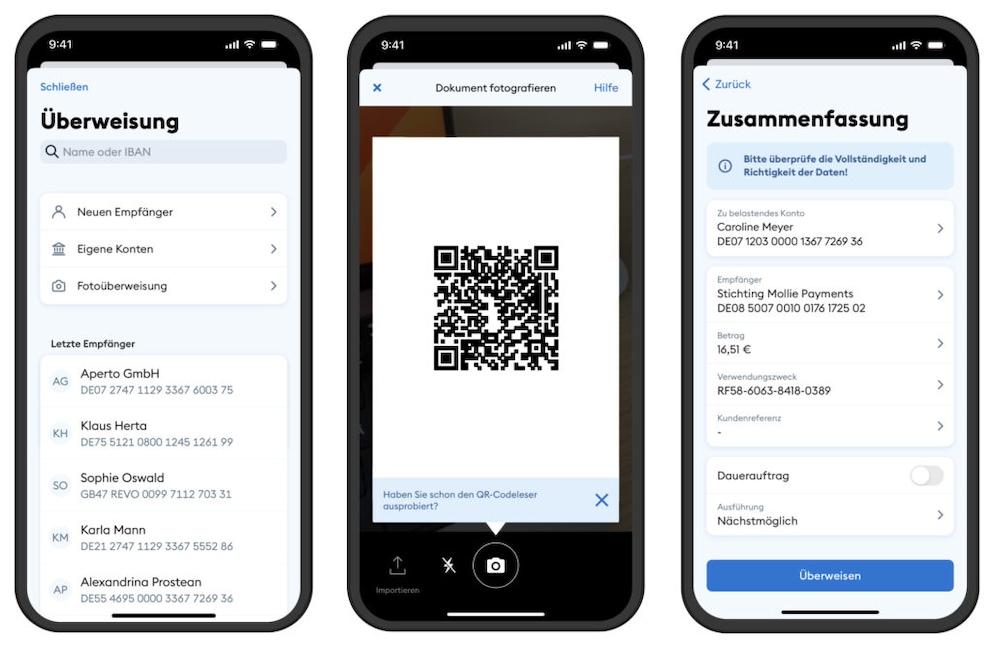
DKB offers two ways to transfer money in its app: the traditional entry of all data into specified fields and the photo transfer. The latter is based on the software from the service provider Gini, which allows users to simply photograph necessary details such as amount, recipient, and subject from an invoice. The Gini software has now received an update that further expands the photo transfer and aims to make it even more convenient.
The central feature of the updated photo transfer in the DKB app is improved usability. Gini has redesigned the user interface and screens, allowing banks to customize them specifically to their design. DKB has incorporated these changes into its app with an update. The update, version 2.2, is now available for iOS and Android, but is slightly more extensive for Apple devices.
Read also: Things to consider when giving cashless tips
DKB Allows Transfers Directly from PDFs and WhatsApp
To use the photo transfer in the DKB app, payment data previously had to be available as a photo. With the update to the banking app, it is now possible not only to scan a QR code with relevant transfer information but also to scan a PDF, allowing users to avoid manually copying payment data from the document into the DKB app. This feature is practical, as most invoices now arrive digitally via email. After the update to the DKB app, users can select the corresponding PDF with the invoice via photo transfer. The system uses a secure AI to scan all data relevant to the transfer, reads it, and automatically transfers it into the transfer form in the banking app.
Read also:DKB update brings practical function for the app
The transfer is even easier and faster with the new “Share with” function. The corresponding button appears when opening a PDF on the smartphone. When users click it, the transfer mask in the DKB app opens automatically. Here, they only need to check the transfer for accuracy and approve it with a TAN. DKB describes this innovation in the iOS update 2.2 as follows:
- New function for photo transfer: Open invoices easily via “Share” directly with the DKB app and approve the payment.
Another new function of the photo transfer in the DKB app is the so-called screenshot transfer. While it may sound simple, it now also enables transfers from popular messenger apps like WhatsApp. Here’s how it works: If users receive data for transfers within a chat on WhatsApp or another messenger, they can simply take a screenshot. They then send the screenshot using the mentioned “Share with” function to the DKB app. Here, the AI tool reads the IBAN, invoice amount, and recipient details and transfers the data into the transfer form, which users then only need to approve.

WhatsApp to Get Handy Scan Feature

Update for DKB App Finally Unlocks Important Features
New DKB Photo Transfer Saves Time
With QR code, PDF, and screenshot transfers, the photo transfer in the DKB app is complemented by additional practical options that aim to make smartphone banking more convenient. The “Share with” function, in particular, saves users several steps and thus time. “Absolute user-friendliness is the key to successfully designing the banking of tomorrow. If we manage to make processes like photo transfer intuitive and easy to understand, we simplify our customers’ everyday lives and enable a smooth and efficient banking experience,” explains Maren Heiß, head of retail banking at DKB.
Read also: DKB changes online banking – users need to act
Both DKB and Gini, the company behind the scenes, guarantee maximum security with the new photo transfer. Thanks to the App2App interface, the user experience remains fully digital and is said to be 85 percent faster than the manual process. “We are pleased that DKB customers can now benefit from our further development,” says Holger Teske, co-founder and managing director of Gini GmbH. “With the new user interface and improved user experience, photo transfer is now even more convenient.”
What Else Does DKB App Update 2.2 Offer?
As mentioned earlier, DKB has integrated the innovations in the current update, version 2.2, into its app. They have been available for download for both Android and iOS for a short time. However, the changelog reads differently. In the Android update, DKB only mentions the following adjustments:
- You can now also trade bonds in the DKB app’s portfolio.
- Additionally, we continue to address minor bugs and develop new features behind the scenes.
In the changelog for the iOS version of the app, the following adjustments are listed:
- New function for photo transfer: Open invoices easily via “Share” directly with the DKB app and approve the payment.
- You can now also trade bonds in the DKB app’s portfolio.
- Now choose the template for new transfers from your recent transfers instead of recent recipients.
It is not uncommon for DKB to proceed somewhat differently with updates on both platforms. Usually, either the Android or iOS version of the app is updated first, with the other following shortly thereafter. Android users should soon receive the “Share” option for photo transfers.