



March 24, 2026, 9:13 am | Read time: 4 minutes
Large online retailers, especially Amazon, constantly adjust their product prices. Understandably, this makes it difficult for consumers to keep track and know when a purchase is truly worthwhile. Fortunately, there’s the website CamelCamelCamel.com, which tracks how Amazon prices change.
The site Camelcamelcamel.com is a handy price tracker for the online shopping leader Amazon, allowing users to easily find out if a desired product was ever offered cheaper on the Amazon site. The tool was developed in 2008 as a code experiment and was not intended as a long-term project. Now, nearly two decades later, it is one of the best price trackers for Amazon on the market.
Track How the Price Has Developed
Camelcamelcamel.com not only tracks the price history of Amazon products but also considers those from third-party sellers and used items. To display the history, users simply need to copy the product’s URL from the Amazon site and paste it into the search bar on Camelcamelcamel.com. Alternatively, items can be found directly through the site’s keyword search. Before doing so, ensure that the German Amazon store is selected; otherwise, items from the U.S. store are displayed by default.
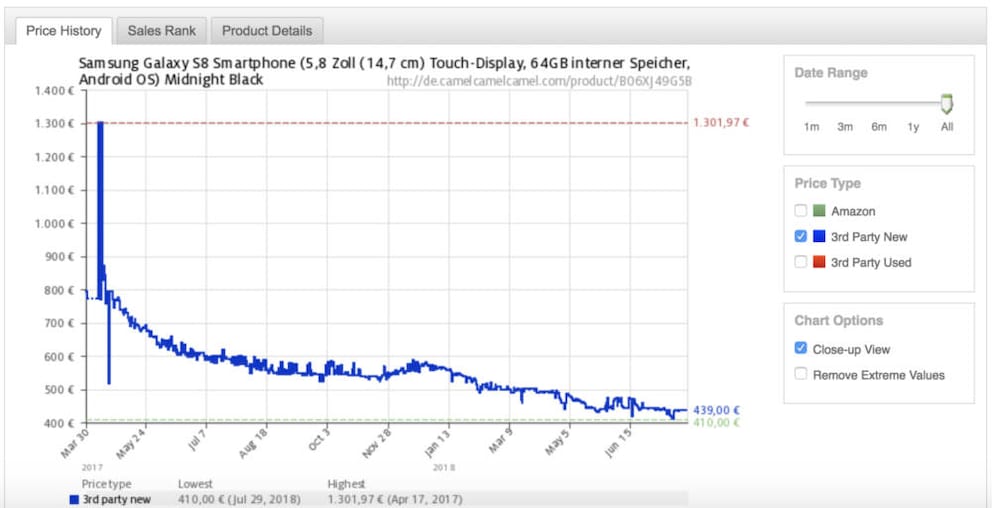
With the price tracker, you can immediately find out if an offer is truly a bargain. The price history curve makes it easy to see if the item was ever significantly cheaper. The horizontal axis of the chart shows the time span during which the item was available on the Amazon site. The vertical axis shows the price range.
For a better overview, you can click on Close-up View to visually enlarge the price history curve. The Remove Extreme Values option also removes extreme price changes from the curve. Users can also set whether they want to see only the price from Amazon or also the price from third-party sellers and how much the item costs used. Additionally, the time period of the price history can be restricted to consider only changes within the last three months, for example.
Further down, the current, lowest, highest, and average prices are clearly listed. Here, too, you can select which provider’s prices (Amazon, third-party sellers, or used items) should be displayed. Above that is a list showing when the last five price changes occurred.
Notification of Price Drops
On the site, trackers can be set to be informed about price changes via email, X (formerly Twitter), or RSS feed. This is especially useful if you don’t need a product immediately and can wait for it to drop back to the lowest price level. You just need to enter a target amount, and the site will send a notification when the item price falls below that amount.
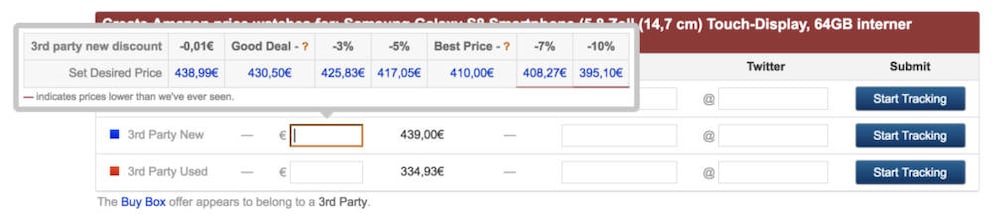
If you have a wish list on Amazon, you can transfer it to Camelcamelcamel.com so the site can track the price development of the items on the list that you haven’t purchased yet. However, this requires registration.

How Amazon Wish Lists Can Become a Threat

Amazon Makes Prices More Transparent
What Else Can the Site Do?
For hardcore bargain hunters, there’s the “Camelizer” extension for Firefox and Chrome, which allows you to view the price development directly on the Amazon product page. The Camelizer can be found on the site under the Tools tab.
The site also has RSS feeds for the biggest price drops (Top Amazon Price Drops) and the most popular products (Popular Products). However, the latter is not yet available for Amazon.de.
Also interesting: With these 8 tips, you can save on Amazon
Keepa as an Excellent Alternative
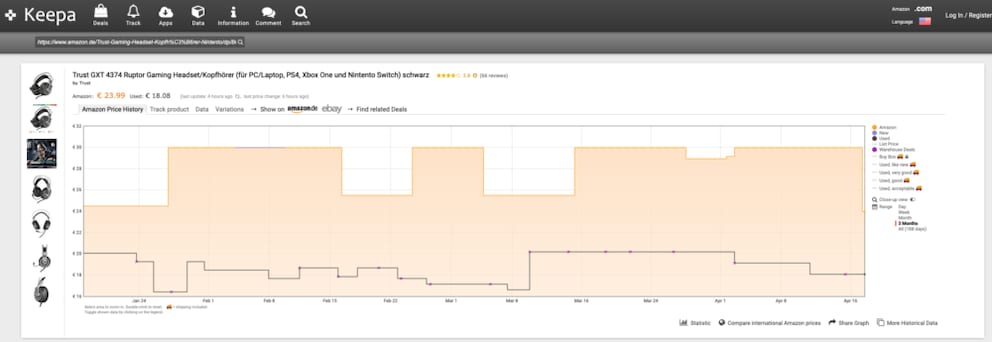
Camelcamelcamel offers a lot of practical features, but competitor Keepa is also worth a look. The site presents even more clearly when a product cost what with which seller. Simply hover over the price curve with your mouse, and the prices for Amazon, Amazon Warehouse Deals, and used and new items from third-party sellers are displayed. This makes the search for a specific price much more interactive than on the site with the humps. Keepa also has a price tracker, but you need to register for it.