

November 2, 2023, 12:28 pm | Read time: 4 minutes
It’s not unusual for WhatsApp to roll out smaller updates regularly. However, the recent changes have all been more significant–including the currently planned design changes for the messenger.
WhatsApp is currently implementing a series of major changes. Just in August, it introduced the ability to send images and videos finally in high HD resolution. This feature had long been requested by users of the messenger. A new design is also being actively developed behind the scenes. Some Android users have already had a glimpse of the new WhatsApp design. Now, iPhone users are next. But what exactly is changing?
Overview
WhatsApp updates its design via update
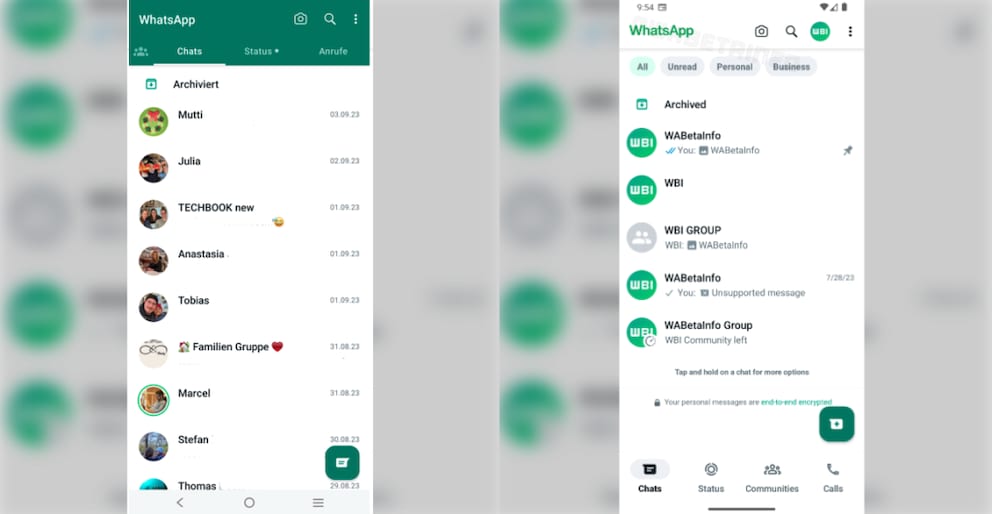
New colors, new icons, new arrangement of elements–WhatsApp plans to completely change the design of its app. In recent months, Android users, in particular, have been able to get an impression of the new look in beta versions. They reported that the menu bar has moved from the top to the bottom of the display. Also, the buttons are no longer round but rectangular with rounded edges.
The website specializing in the messenger, WABetaInfo, has also reviewed the beta version 2.23.18.18 for Android and filtered out the first images of the new design. According to them, the color scheme of the app’s header area will change. Previously, the field was in the typical WhatsApp green. In the future, however, the area will have a white background with green elements–at least in the standard version. Those using dark mode probably won’t see any color changes. The font in the menu bar will also change slightly with the new design.

WhatsApp Introduces New Chat Search Feature

WhatsApp Introduces Noise Canceling for Calls
New icons, buttons, and filtering options
However, the icons will likely be partially adjusted for both versions. While the prominent camera icon for photos and the magnifying glass for the search function will remain, the profile photo will be directly next to them. Through this, users can access their account information and possibly make adjustments. The reason for this is likely that WhatsApp is soon introducing the long-awaited feature of using the messenger with multiple profiles.
Additionally, similar to an email inbox, several filtering options will be available directly above the chat list. With a single tap, users can display all unread, personal, or business messages. This feature has already been available in several variants in earlier beta versions.
New WhatsApp design now officially for iPhone too
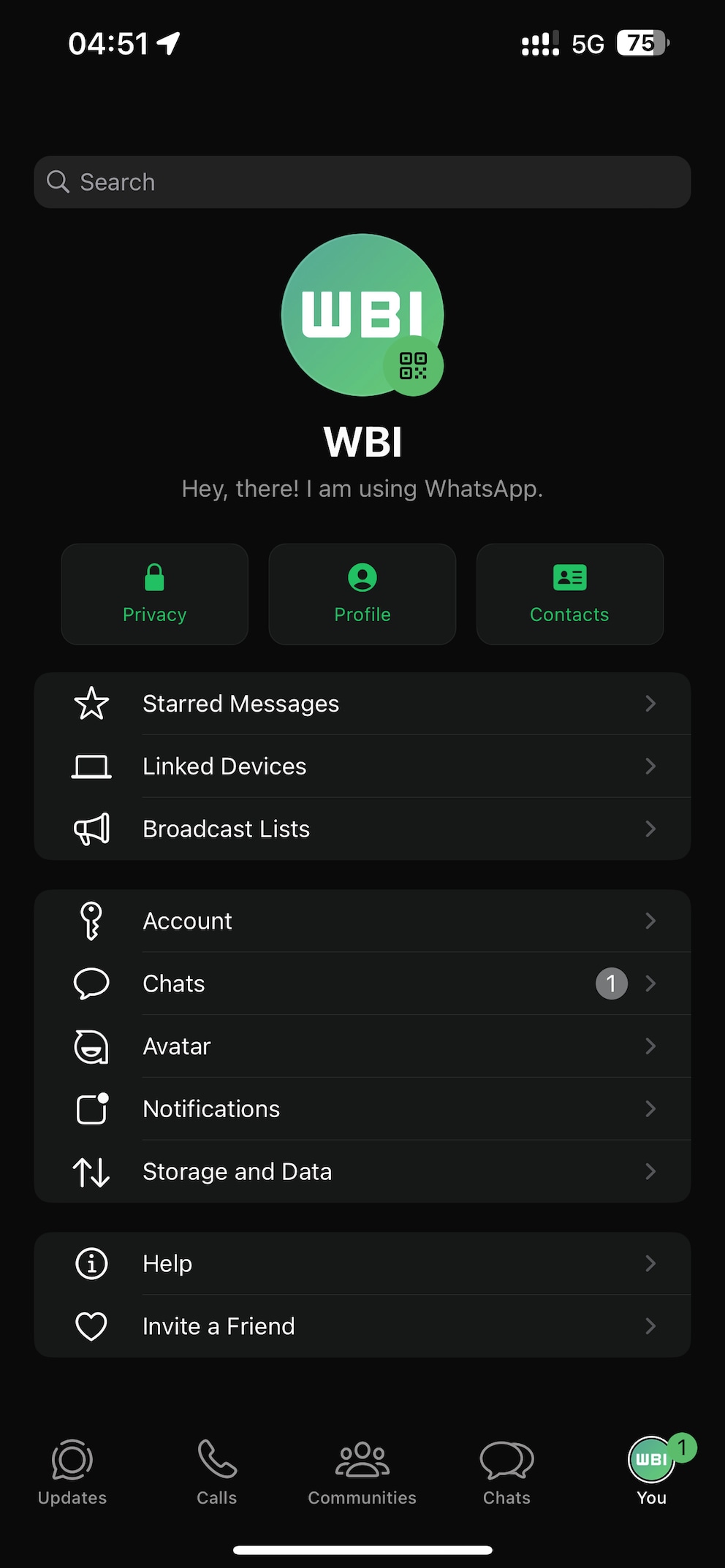
When exactly the changes will be implemented across the board was not yet known. However, WABetaInfo reports that some iPhone users have already been able to officially download the update with the new WhatsApp design. According to the blog, it is officially available in the App Store with update 23.21.72 for iOS. However, Apple did not mention the design adjustments in the changelog.
“We can confirm that a limited number of users can finally experiment with the new user interface, which was previously reserved for some beta testers. It is important to note that the new user interface includes a new green color as the main tint of the app. Additionally, newly designed icons are available in the app settings and on the chat info screen,” say the experts at WABetaInfo.
With such major updates, WhatsApp usually takes a bit more time with the rollout. iPhone users may therefore receive the new design gradually over the coming weeks. And Android users likely won’t have to wait much longer either. Since the feature is already in beta, at least participants in the Android test version can already get a glimpse of the adjustments.
Since the WhatsApp menu bar on iOS has been at the bottom of the display for some time, the described color and icon changes are likely to be of particular interest for the iOS version. One thing is certain: The updates for iOS and Android bring the two versions of the app closer together visually and functionally–with the most significant changes affecting Android users.
How to become a WhatsApp beta tester: