


November 19, 2025, 2:04 pm | Read time: 3 minutes
The feature has long been available on Android, but iOS users had to resort to workarounds until now. The ability to use two WhatsApp accounts simultaneously is finally coming to the iPhone. The messenger is already rolling out the update to registered beta testers, and more users are expected to follow soon.
iOS Finally Catches Up with Android
The WhatsApp insiders at “WABetaInfo” have discovered the new multi-account option in the current beta version 25.34.10.72 for iOS. Through the settings, a second account can be activated in addition to the one already active. Until now, iOS users could only sign in with a single WhatsApp account. Using an additional account was only possible through the separate WhatsApp Business app.
In the current beta, however, signing in with two separate accounts is finally available for the iOS version of WhatsApp. According to “WABetaInfo,” switching between accounts should work seamlessly without restarting the app or logging in again. Additionally, chat history and app settings are completely separate, allowing users to set individual preferences for each registered number.
Faster Switching than on Android
Although the iOS version of the account-switching feature took a long time to arrive, it seems to come with a few practical extras that the Android app lacks. Instead of having to click the context menu and select “Switch Account,” iOS users only need to double-tap the “Settings” tab.
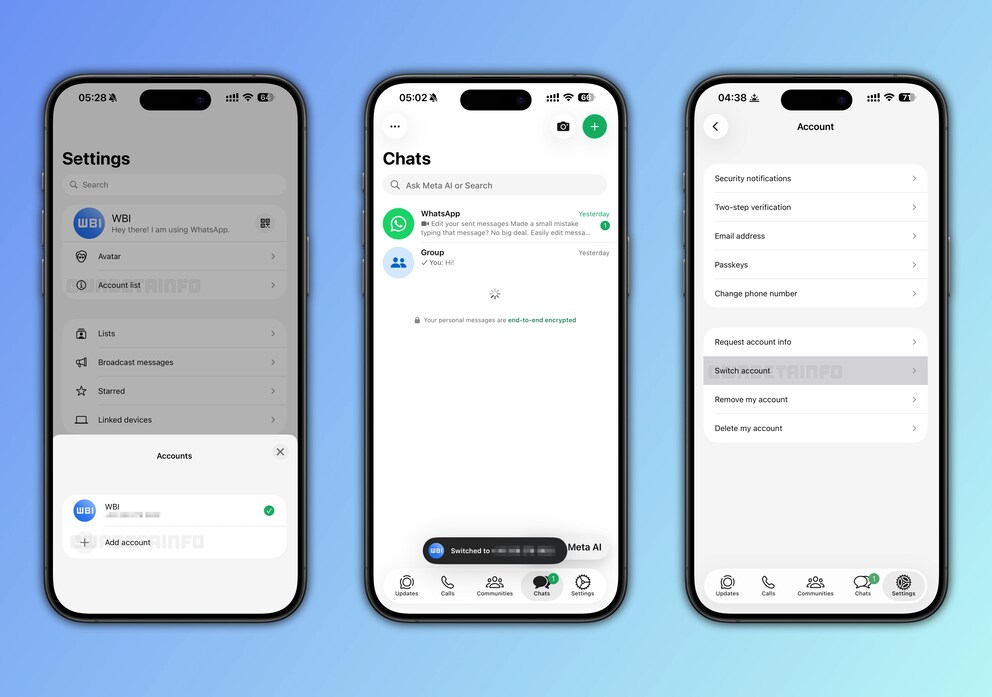
Apart from the quick switch, changing accounts via the list of logged-in accounts in the settings is also possible. Holding down the “Settings” tab brings up the account overview. Here, users can directly see which account is currently active and switch quickly. An animation appears during the switch to clearly indicate the change to users.
Adding a second WhatsApp account is done through a new “Account List” option in the settings. After that, users sign in with their phone number and a verification code, just like during the initial app setup. Users who have been using a second account via WhatsApp Business can integrate it without issues. Even using it as a linked device is possible if the phone number is already logged in on another smartphone.

WhatsApp May Soon Allow Three Accounts in One App

WhatsApp Plans Free Backup Storage
Two Separate Accounts in One App
The new WhatsApp beta for iOS treats the two accounts as completely separate instances. WABetaInfo writes: “Each profile has its own chat history, backup configuration, and notification sounds, so the settings of one account do not affect the other.” Users can also determine how each account downloads media and set separate privacy settings, such as read receipts.
WhatsApp has also optimized the display of notifications in the iOS version. Users receive notifications for both accounts, even for the inactive one. Notifications show not only the sender’s name but also the name of the account to which the message was sent.
Also interesting: WhatsApp Brings New Storage-saving Feature to iPhone
First Public Test Version Circulating
WhatsApp is currently testing the new feature with beta users who have registered for pre-release versions of the messenger via Apple’s Testflight app. This makes the use of two WhatsApp accounts on an iPhone publicly available for the first time. According to WABetaInfo, Meta is likely to expand the test run to non-beta users soon.