

September 22, 2023, 9:14 am | Read time: 4 minutes
WhatsApp is the world’s most popular messaging service. However, it seems the provider doesn’t want to rest on its laurels and has now integrated a feature we already know from Telegram.
The WhatsApp messenger is primarily just that: a pure messenger. Although the provider continuously expands its features through a steady stream of updates, WhatsApp has now introduced so-called Channels (called “Kanäle” in German) following the example of competitor Telegram–one of the biggest innovations in recent years. TECHBOOK reveals what this is all about and how the channels work.
WhatsApp Introduces Channels for Messenger
The WhatsApp Channels are intended to position the messenger more clearly as a news platform. The service announced this back in June 2023, among other places on its blog. According to WhatsApp, the channels are a way to “receive important updates from individuals and businesses directly (…).”

The new feature initially launched in Singapore and Colombia. However, it is now also available in Germany, among other places. At release, only selected organizations, such as the World Health Organization (WHO), can open a channel. But celebrities like Meta CEO Mark Zuckerberg already have their own channel that you can follow. Those using the feature will also find major soccer clubs like BVB or Bayern Munich.
WhatsApp also seems to be interested in generating administrators for the new feature. The announcement mentions that channels could be a good way to build your own business, for which the messenger’s payment services would also be available. This includes, among other things, the WhatsApp Pay service, which is already available in some countries like Brazil.

WhatsApp Deletes Millions of Accounts Due to Global Fraud Scheme

WhatsApp Message from Amazon? Here’s What’s Behind It
How the WhatsApp Channels Work
To use the WhatsApp channels, you need to go to the new tab called “Updates.” There you will find the “Channels” section, separate from the chats and status messages of existing contacts. Channels selected by the user are then located under the WhatsApp status messages of contacts. Additional channels can be added at any time via the plus symbol.
To help individual users find channels of interest, there is a large directory. This allows filtering by specific topics or names. You can also use pre-made filters to find the most active or popular channels.
Also interesting: Soon, messages can be sent to other messengers via WhatsApp
If you want to join a channel on WhatsApp, you can do so directly through the messenger or via a special invitation link. After 30 days, all content from a channel is deleted; administrators can remove shared images, links, or status messages earlier if necessary.
With messengers like WhatsApp, data protection is often an issue. To ensure this with the new channel feature, profiles and linked phone numbers are not visible–neither to administrators nor to other channel members. This is particularly relevant because the channels are not end-to-end encrypted.
We are interested in your opinion!
Read also: WhatsApp is working on extensive video functionality
Can You Disable WhatsApp Channels?
Not everyone seems to be a fan of the channel feature. Right after the feature’s launch, Google search terms like “hide WhatsApp channels” or “delete WhatsApp channels” trended. Unfortunately, there is–at least so far–no official solution offered by WhatsApp to disable the channels. However, with a few tricks, you can partially bypass or ignore them if you wish.
Read also: WhatsApp gets 3D avatars
The most obvious solution is, in the first step, not to subscribe to any WhatsApp channels. However, if you have followed a channel that no longer interests you, you can easily unsubscribe. To do this, you need to be in the channel’s overview and click on the menu at the top right. There you will find the action “Unsubscribe,” highlighted in red text. Alternatively, you can mute the channel directly next to the menu using the bell icon.
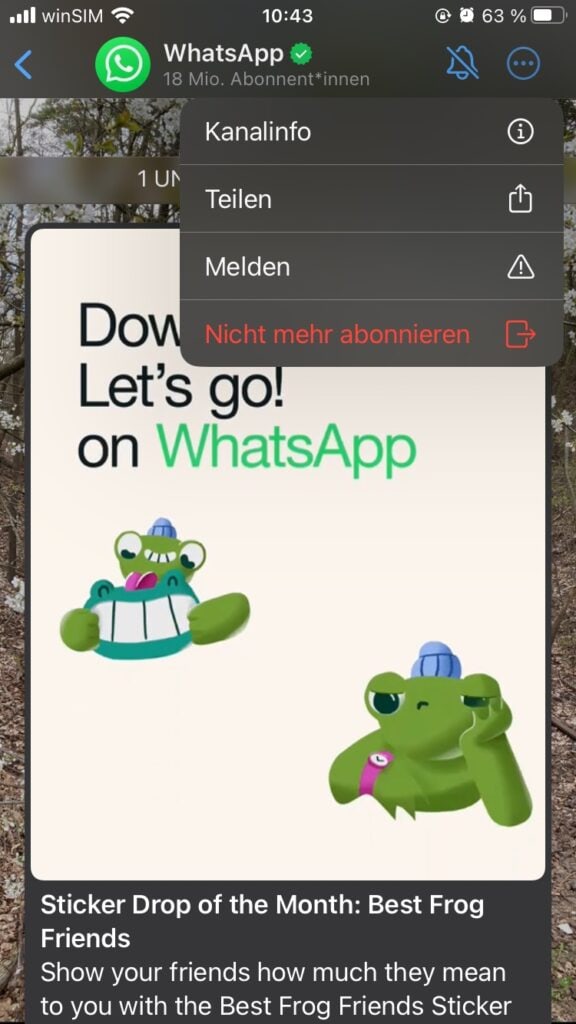
This makes the WhatsApp channels less visible but does not completely disable them. Android users theoretically have the option to revert the messenger to an older version without channels. However, we strongly advise against this for security reasons. Perhaps WhatsApp will soon respond to its users and offer an official option to hide or disable the channels. TECHBOOK will keep you updated on this.