


September 17, 2026, 7:34 am | Read time: 3 minutes
With iOS 27, Apple introduces a series of new AI-powered tools for photo editing. The “Spatial Reframing” feature allows users to change the perspective of a photo after it has been taken by generating previously unseen areas of the image. This usually involves simply adding existing textures such as leaves, clouds, or roads. However, in a curious case, Apple’s AI tool added an entirely fictional person to a photo. TECHBOOK was able to replicate the issue.
AI Invents Complete Strangers
As a user reported on Reddit, the phenomenon occurred with “Reframe” while editing a photo of a horse. After calculating the new image section, an unknown man suddenly appeared, who was not present in the original:
Upon inquiry, the user also showed the original image, where a tiny part of a red cap and a shoulder are visible behind the horse. The AI tool recognized that a person must be behind the horse and filled the space created by reframing the photo accordingly.
The user referred to the added man as a complete “Rando.” The person was unknown to him and was entirely generated by the photo editing tool.
iOS Gets New Photo Editing Feature Already Available on Android

Meta Unveils New AI Image Generator
TECHBOOK Can Replicate the Issue
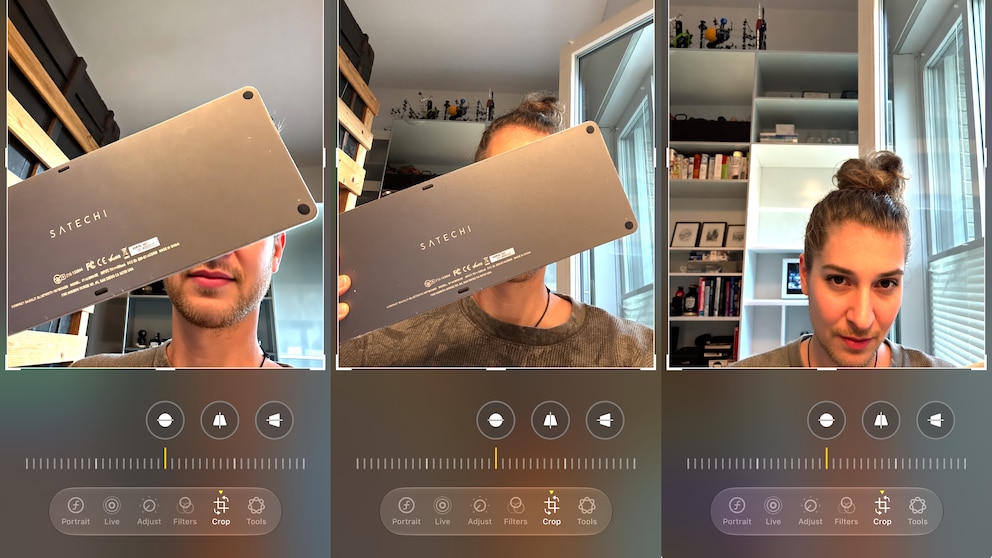
After some experimenting with new and existing photos, TECHBOOK was indeed able to create photos with entirely AI-generated faces. As our example shows, it is enough to cover the face with an object so that the torso and part of the head remain visible.
In our example, I held a Bluetooth keyboard in front of my face and then tried to shift the image section so that my face peeked out from under the keyboard. “Spatial Reframing” actually engaged with this and, in one case, generated the lower part of the face and, in another case, a completely new face.
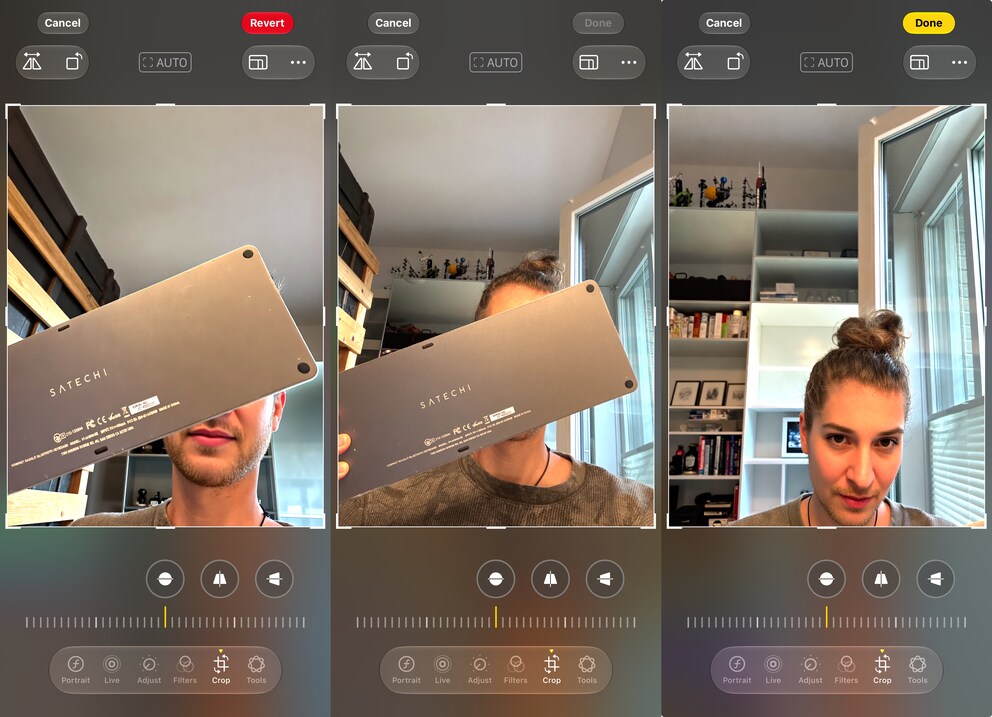
At least the results are very flattering, even if they do not nearly correspond to reality. Apple could improve this by using existing image material in the user’s library for face reconstruction.
How “Spatial Reframing” Works
With iOS 27, Apple expands its AI tools for photo editing in the library. In addition to an improved “Clean Up” function, “Expand” and “Spatial Reframing” are added. “Expand” allows a photo to be enlarged by generating additional areas at the edges. “Spatial Reframing,” on the other hand, allows the angle of capture to be completely changed afterward.
This can, however, reveal areas that were previously obscured by the photo subject. The AI tool must supplement these based on the existing details. In the case of the horse photo, the small visible part of the cap and the shoulder with a black T-shirt served as starting points. Between these two points, “Spatial Reframing” inserted a person.
The Reddit example thus highlights a fundamental limitation of artificial intelligence in photo editing. Missing image information cannot be retrieved afterward, as smartphone cameras still only capture photos in two dimensions. Generative AI can fill the gaps, but the result remains merely an approximation of reality–and nothing more.