


March 25, 2026, 11:23 am | Read time: 3 minutes
With iOS 26.4, Apple releases a comprehensive update for the iPhone. The update brings numerous new features and technical improvements. The focus is on new emojis, a revamped keyboard, and numerous security updates. Apple is responding to specific user issues in daily life as well as newly discovered system vulnerabilities.
New Emojis and Visual Enhancements
With iOS 26.4, a new batch of emojis arrives on the iPhone. Newly included are a trombone, an orca, a landslide, and a treasure chest. A distorted face, a comic fight cloud, and a hairy creature (“Bigfoot”) are also part of the update.
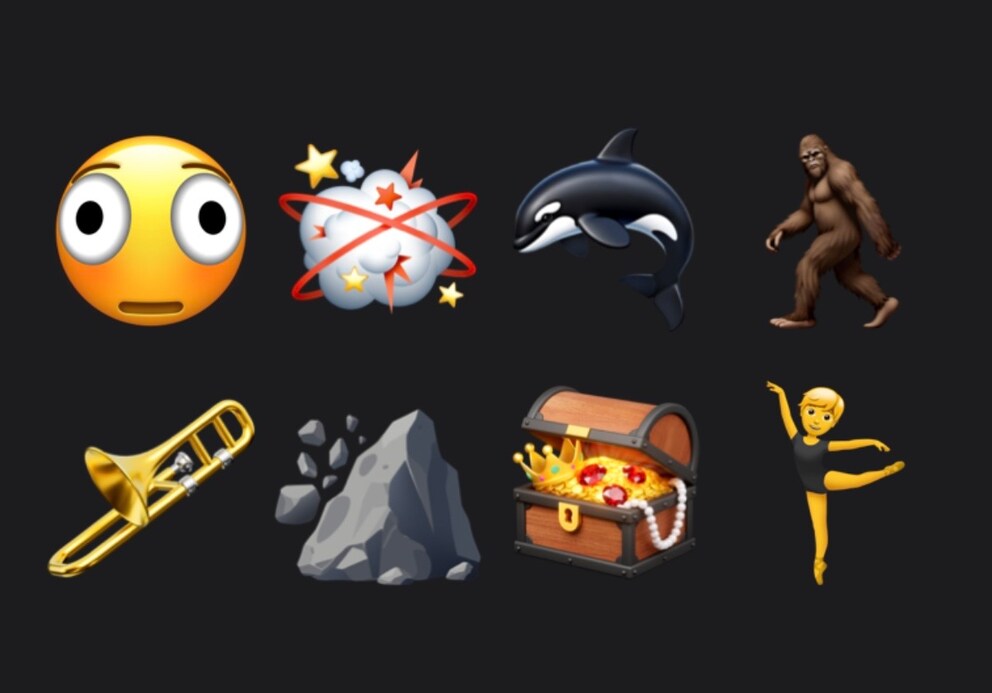
Additionally, existing emojis have been supplemented. These include new skin tone options for several figures. A gender-neutral option is now available for the ballet dancer emoji.
The basis of the new symbols is Unicode 17.0. Apple had already prepared the integration, and with iOS 26.4, the emojis are now fully visible and usable in the system.
Updates for Apple Music and Podcasts
In addition to the emojis, Apple is also expanding key apps. In Apple Music, playlists can now be created via text input. Users automatically receive a list of suitable songs based on a description.
Additionally, Apple Music displays concerts and tour dates of preferred artists in the area. Albums and playlists have been visually revamped and now feature large backgrounds.
Another update concerns Apple Podcasts. The app now supports video podcasts with live streaming. Content can be played as video or audio and also saved offline.
iOS 26.4 Fixes Annoying Keyboard Bug
A key focus of iOS 26.4 is the iPhone keyboard. In previous versions, there were increasing problems with text input, especially during fast use. Inputs were sometimes incorrectly implemented or not correctly adopted. The autocorrect also often suggested inappropriate words or did not reliably recognize the context.
Apple is responding with targeted improvements. In the release notes, the manufacturer mentions “Improved keyboard accuracy when typing quickly.” We noticed significantly more precise input after the update.
Protection for Stolen Devices
Another component is protection for stolen devices. The feature is enabled by default with iOS 26.4 and provides stronger protection for sensitive areas. Certain actions require additional confirmation via Face ID or Touch ID. This is intended to prevent unauthorized access to important data even if the code is known.
New Emojis Discovered in iOS 26.4

iOS 26.4 Fixes Annoying Keyboard Bug
Numerous Security Vulnerabilities Fixed
On the support page, Apple has published the list of security improvements included in iOS 26.4. These affect, among other things, the Wi-Fi function, Apple accounts, iCloud, Mail, Siri, and WebKit. At least Apple is not aware of any cases where the security vulnerabilities have been actively exploited by hackers.
Should You Install iOS 26.4 Right Away?
Although iOS 26.4 does not patch critical security vulnerabilities, users should install the update promptly to avoid giving hackers any opportunity. The main reason to install it, however, is the improvement of the iPhone keyboard. Those who have noticed that the keyboard inaccurately implements inputs or has other issues can hope for relief through the update.
So far, we have not noticed any problems after installing the update. In the beta phase, earlier versions (Beta 1 and Beta 2) still had performance limitations. However, these do not occur in the final update.
iOS 26.4 is now available for download for iPhone 11 or newer in the settings under “General” > “Software Update“.