



June 5, 2023, 12:05 pm | Read time: 3 minutes
An update to Google Play Services is causing saved contacts on phones to no longer be displayed. TECHBOOK reveals what to do next.
Nowadays, few people know their most important phone numbers by heart. Why bother when they are easily accessible on a smartphone that you always have with you? But what if these entries suddenly disappear? This is exactly what can happen due to a recent update to Google Play Services, as Google has changed the synchronization of contacts on Android phones.
Overview
Update causes contacts to disappear from Android smartphones
Previously, when adding a new contact on a smartphone, users could choose where to save it. Options included the Google account, directly on the phone, or on the SIM card. However, with the latest update to Google Play Services, the option to save on the device has been removed. And this has consequences.
Many users may not have noticed the update to version 23.20, as Google rolls it out automatically in the background, unlike app updates, which need to be manually initiated. However, even if the update to Play Services went unnoticed, it affects some users. Contacts previously stored on the Android smartphone are now gone. The changelog for the update states: “Disabling synchronization with Google Contacts Sync now removes previously synchronized contacts from your Android phone.”
But what does this mean exactly? Previously, contacts continued to be displayed even if users turned off synchronization on their Android smartphones. Changes to the entries were then only visible locally on the respective device. The transfer to other devices linked to the Google account only occurred after synchronization was turned back on. However, the Google Play update now means that contacts stored on the Android smartphone are no longer displayed once users turn off synchronization.

Restore Disappeared Contacts on WhatsApp

How Deleted WhatsApp Messages Become Visible Again
How to restore missing contacts
Google did not make a big announcement about the adjustment brought by the Google Play update. Many users who suddenly miss contacts will therefore be confused.
The good news: The contacts have not completely disappeared from the Android smartphone but are still in the cloud (provided they were synchronized at least once before). To make them visible again, users simply need to reactivate synchronization on their device. Here’s how it works:
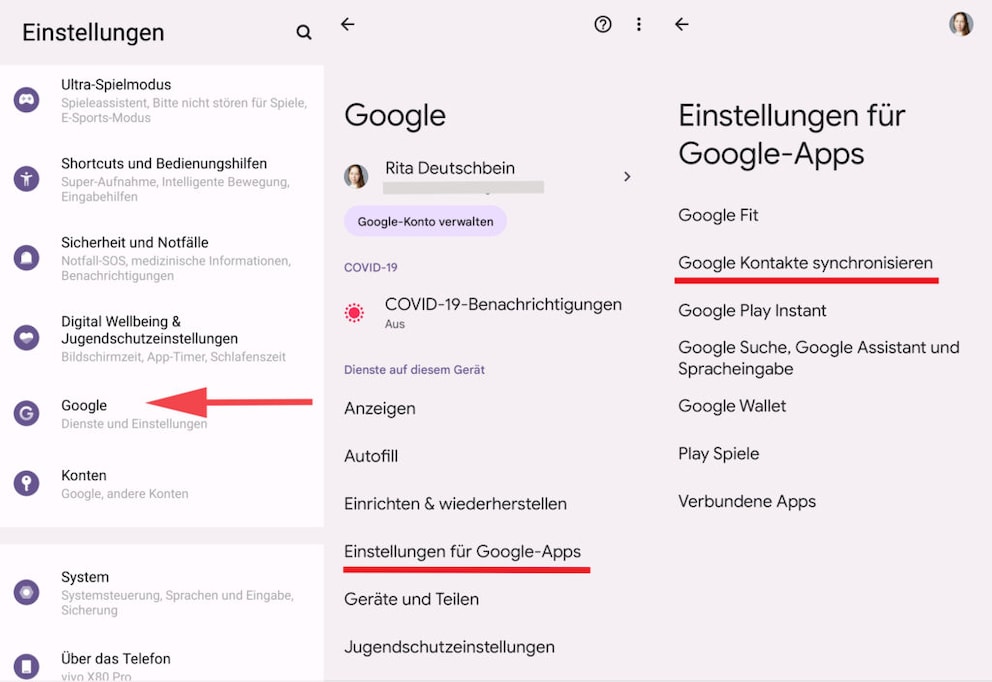
- Go to the settings of your Android smartphone. Here you will find the Google menu item.
- Open “Settings for Google Apps” and click on “Sync Google Contacts.”
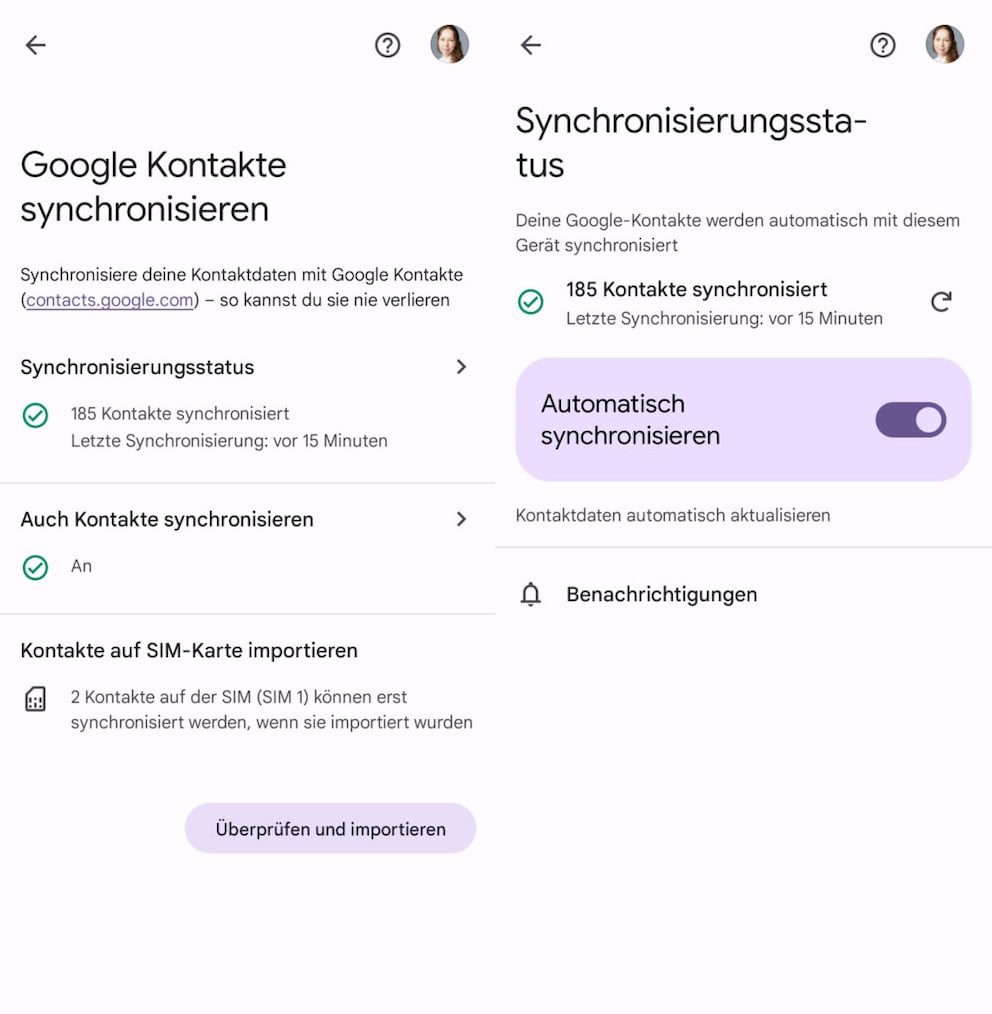
- Within the displayed sub-items, you can now activate automatic synchronization.
Depending on the device and Android version, the settings may be named slightly differently.
Access contacts via browser
If you are missing contacts on your Android smartphone, you should first check whether synchronization is actually active. It should also be noted that after activation, it may take a few minutes for all contacts to become visible on the phone again. A stable internet connection is necessary for synchronization, as the contacts are transferred to the cloud. It is therefore questionable what happens if this connection breaks or is too weak during the sync process.
If you are in a hurry, you can also search for a specific contact via the browser. Once synchronized, the entries can also be accessed and edited via the browser if desired. To do this, users must log in with their Google account and visit the link https://contacts.google.com/.