


May 21, 2024, 1:50 pm | Read time: 3 minutes
A major flaw in an iOS update caused previously deleted photos to reappear in the Photos app on the iPhone. Apple responded promptly and fixed the issue–but users are still waiting for an explanation.
Recently, iOS 17.5 introduced a range of new features to the iPhone. However, some users experienced issues with the Photos app. A subsequent update, iOS 17.5.1, now resolves these problems.
iOS 17.5.1 Fixes Photo Issue
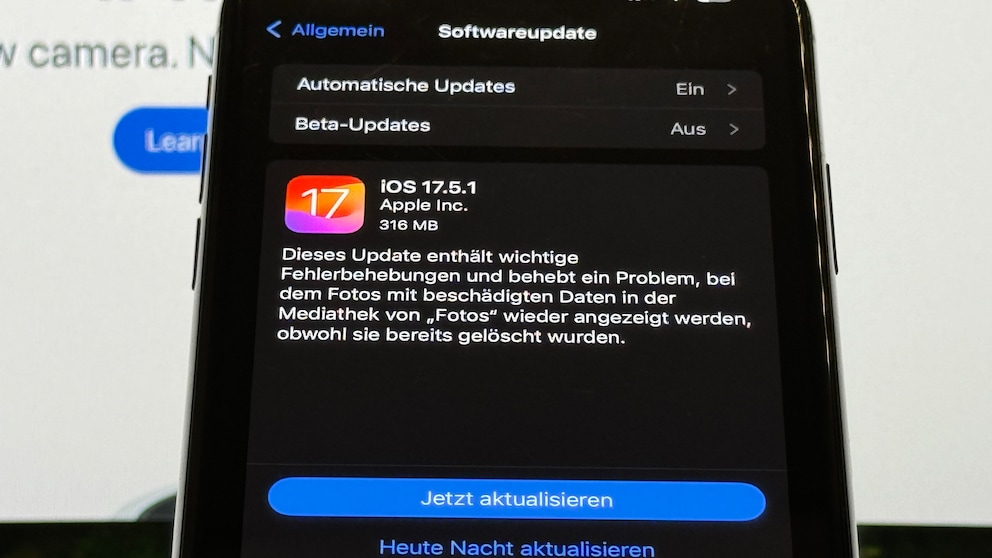
The Apple support page and the release notes in the update settings on the iPhone provide the following information about the contents of iOS 17.5.1:
This update […] addresses an issue where photos with corrupted data reappeared in the Photos library even though they had already been deleted.
In the original wording (in English), the problem is explained more clearly. It states that the photos were affected by a database corruption. This suggests that iOS 17.5 caused an indexing error in the Photos app. For photos to be accessible in the database, they must be indexed. In such a system, it is common for deleted photos to simply not be indexed–and thus not retrievable. They are only truly deleted when overwritten by other files.
However, users suddenly seeing photos they deleted up to 14 years ago should not happen. The database issue raises doubts about how secure personal files really are with Apple. The company repeatedly emphasizes that user security is a top priority. Such an error, however, calls these assurances into question.
Update to iOS 16.3.1 Renders Popular App Unusable

iOS 26.0.1 Is Here–What’s in the iPhone Update
Apple Comments on the Incident
Apple has now spoken to “Ars Technica” and explained the background of the incident. According to Apple, it involved locally stored photos, not those uploaded to iCloud. A database error caused photos marked as deleted not to be fully erased. Apple also specifically addresses individual cases where deleted photos reappeared on another device. In these instances, users had set up the new device with a local backup or directly copied data from the old device where the images were originally deleted.
Should You Install the Update Immediately?
If you are affected by the photo bug, you should install iOS 17.5.1 immediately. The update is only a few hundred megabytes in size, so installation doesn’t take much time.
iOS 17.5.1 is available for iPhone XS and later. The same bug fix is also available as iPadOS 17.5.1 for iPad Pro 12.9 (2nd generation and later), iPad Pro 10.5, iPad Pro 11 (1st generation and later), iPad Air (3rd generation and later), iPad (6th generation and later), and iPad mini 5th generation and later.