


March 12, 2024, 4:58 pm | Read time: 3 minutes
In 2024, you’d have to be in a dead zone to get lost. Thanks to apps like Google Maps, many people have all sorts of map information readily available on their phones. And these are becoming increasingly detailed. Now, the new Immersive View for routes has also been released in Germany. TECHBOOK explains what it can do and how you can use it.
Overview
This is the Immersive View on Google Maps for Routes
Google announced the Immersive View for route planning on Google Maps in October 2023. The gradual rollout is now also available in Germany, but initially only for Android smartphones.
This is an advancement of the feature of the same name in Google Maps for specific locations. With AI support, detailed, interactive 3D views of the surroundings are generated. The software combines billions of aerial and Street View images. Now, the restriction to individual locations and landmarks is lifted, allowing the view for entire planned routes.
Also read: This free NASA software is worth trying

Ten Little-Known Features of Google Maps and Apple Maps

Google Maps Gains New Features Thanks to AI
Check the Entire Route in Advance
With this innovation, users receive additional assistance for route planning. The Immersive View provides a clear, quick overview of the entire route on the screen, including all roads and intersections, offering clear visual cues for turns.
If needed, users can also select the exact time and even from past days for the display. This gives an impression of how the route looks under different lighting and weather conditions.
However, keep in mind: The feature is only for pre-planning. Unlike the traditional route view, you cannot activate the Immersive View and then follow your route live with its help.
How to Use the Immersive View for Routes
To use the new view, simply follow these steps:
- Open Google Maps and choose a destination
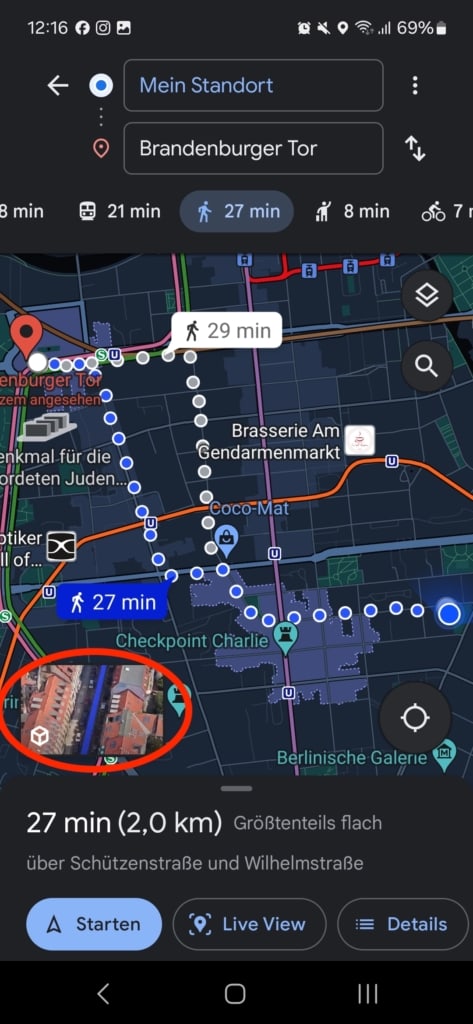
- Press “Route” at the bottom left
- A small animated preview window will appear in the bottom left corner of the map, which you can tap
- The Immersive View is now open, and a clip of your route plays. You can pause it at any time or jump forward and backward on the timeline to view specific sections immediately.
- On the right, you can also press the clock icon. There, you can set the desired time of day or choose a display from the past four days to also depict weather conditions.
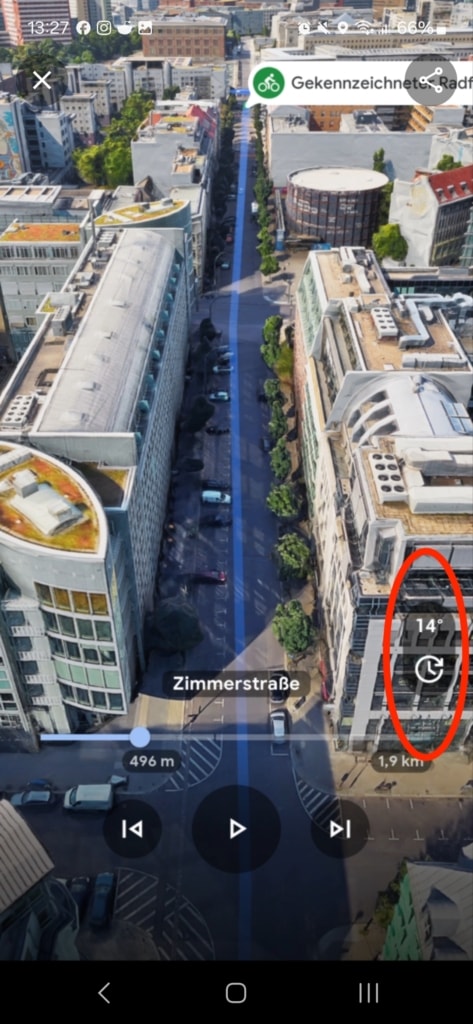
Additionally, in the paused playback, you can swipe your fingers across the screen to zoom in more. If you tap directly on the street, you switch directly to Street View to get a more comprehensive view at street level. This helps you better assess what to expect.
Upon request from TECHBOOK, Google stated that the feature is currently partially available for Berlin, Munich, Hamburg, and Cologne. It is expected to be fully integrated in the coming weeks.