

March 1, 2026, 2:52 pm | Read time: 4 minutes
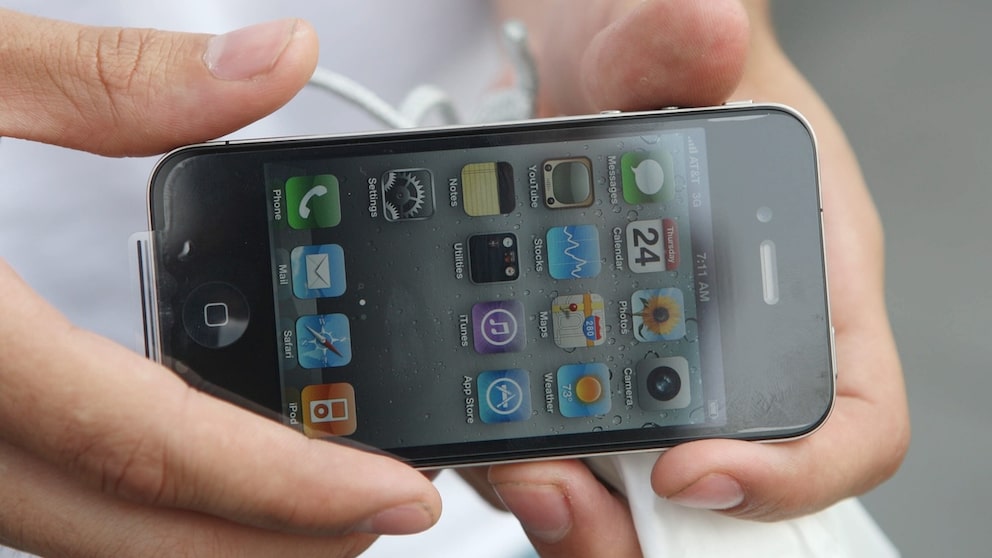
Were you among the many people who couldn’t wait to get their hands on the brand-new iPhone 4 back then? Ironically, it was all about accuracy: A “wrong” movement caused the smartphone to lose reception. This technical glitch and Apple’s handling of it became known as “Antennagate” in tech history. TECHBOOK looks back and reveals how the manufacturer really solved the antenna problem through software—a developer deciphered this about 15 years later.
Apple’s Antennagate–Why the iPhone Suddenly Lost Reception
With the iPhone 4, Apple made a radical design shift. The new generation of the already highly popular smartphone series, which previously featured plastic backs, received glass fronts and backs for the first time. Additionally, a distinctive metal frame gave the device a premium look.
However, as elegant as the design appeared, a technical detail proved problematic: The innovative frame was precisely why the iPhone 4 is considered one of the biggest product blunders in history. The surrounding metal strip was not just decorative but part of the antennas. Holding the device in certain positions could bridge the antenna segments with your hand, with noticeable consequences. Shortly after the launch, reports from users increased, stating that reception suddenly dropped and calls ended abruptly.
The first reaction from Cupertino was somewhat unfortunate. Steve Jobs, then CEO, essentially claimed that users were simply holding the smartphone “wrong.” This statement quickly spread online, became a catchphrase, and significantly contributed to the episode being known as “Antennagate” in tech history.
How Apple Solved the Real Reception Problems
The manufacturer solved the problem back then—at least practically. Apple distributed free bumpers, or smartphone cases, that covered the metal frame. They prevented direct contact between the user’s hand and the antenna segments. A simple measure that was met with some ridicule at the time, but it was effective. For many users, the phone case significantly reduced the issue of dropped calls and video calls.
It should be noted: The metal frame itself was not the problem—otherwise, later iPhone generations wouldn’t have had one. The issue lay in the specific antenna design of the iPhone 4. Later devices used additional antenna paths, isolated segments, and smarter signal switching, so the observed problems no longer occurred.

Why the iPhone 17 Pro Has a Large Hole in Its Casing
The Biggest Apple Flops of All Time
The Main Problem: Software
In retrospect, the Antennagate issue can be described as mostly cosmetic. Users could observe dramatic drops in reception from five to two bars. However, this didn’t always mean that the actual connection lost strength.
Apple admitted in a statement at the time that there was an error in the display of the bars. But it wasn’t until years later, in October 2025, that software engineer Sam Henry Gold discovered how the company actually resolved the issue.
Gold downloaded the original iOS firmware of the iPhone 4 (4.0) and version 4.0.1, he reports on X (formerly Twitter). He examined the CoreTelephony framework, where the signal bars are calculated. He found the answer in the system component “CommCenter,” which is responsible for the cellular connection. The calculation of the bars was itself unspectacular: The system compares the measured signal strength with stored thresholds and assigns them to the bar levels.
20 Bytes of Code Solve the Problem
Gold found that the issue with the bar drop wasn’t the calculation program itself. Instead, the lookup table caused the problem. The conversion of signal strength is not standardized; it varies by manufacturer, network operator, and often by device.
In the original iOS version of the iPhone 4, the values were very “optimistic,” according to Gold. He explains: “If you plot the values on a graph, you see they’re quite ‘jumbled.’ Most of the time, the iPhone shows 4 or 5 bars. However, if you hold it in a way that dampens the antenna, the display drops very suddenly—you see a catastrophic drop from 5 to 2 bars.”
With iOS 4.0.1, Apple adjusted the thresholds. The new values were more evenly distributed, so the display didn’t drop as abruptly from many to few bars. While the actual reception didn’t change, the perception did. This small change consisted of just 20 bytes of code. Nevertheless, it was enough to make the problems appear significantly less dramatic in practice.