



July 22, 2022, 9:30 am | Read time: 4 minutes
Since last year, it’s been possible to transfer WhatsApp chats from an Android smartphone to an iPhone. Now, it finally works the other way around without a third-party solution. The switch from Android to iPhone is significantly simplified.
Unlike competing messenger services, transferring WhatsApp chats to another smartphone operating system was not straightforward for a long time. But that has now changed. Since fall 2021, chat histories can be transferred from iPhones to initial Android devices thanks to Android 12, and now the transfer from Android to iOS is also possible.
Overview
Transfer Function from Android to iOS is Here
In June, WhatsApp and Apple announced the new transfer function that will allow chat histories to be transferred from an Android smartphone to an iPhone–including all messages, pictures, and videos. The option is now complete and out of the beta phase. To use it, WhatsApp version 2.22.7.74 or higher must be installed on the old Android smartphones, and WhatsApp for iOS version 2.22.10.70 or higher must be installed on the new iPhone.
The chat transfer is possible thanks to the new version of the “Move to iOS” app, which Apple provides in the Google Play Store. With it, beta testers can transfer their entire WhatsApp history from Android to iPhone. Many users have wished for such a simple solution for years. However, developing an official solution was cumbersome and lengthy.
Read also: How to Transfer WhatsApp Chats to a New Smartphone
In August 2021, WhatsApp chief Will Cathcart announced that the messenger was working on a transfer function from Android to iOS. A month later, the first hints appeared in the WhatsApp beta for Android smartphones, as reported by TECHBOOK. In January 2022, hints were also found in the WhatsApp beta for iPhone.
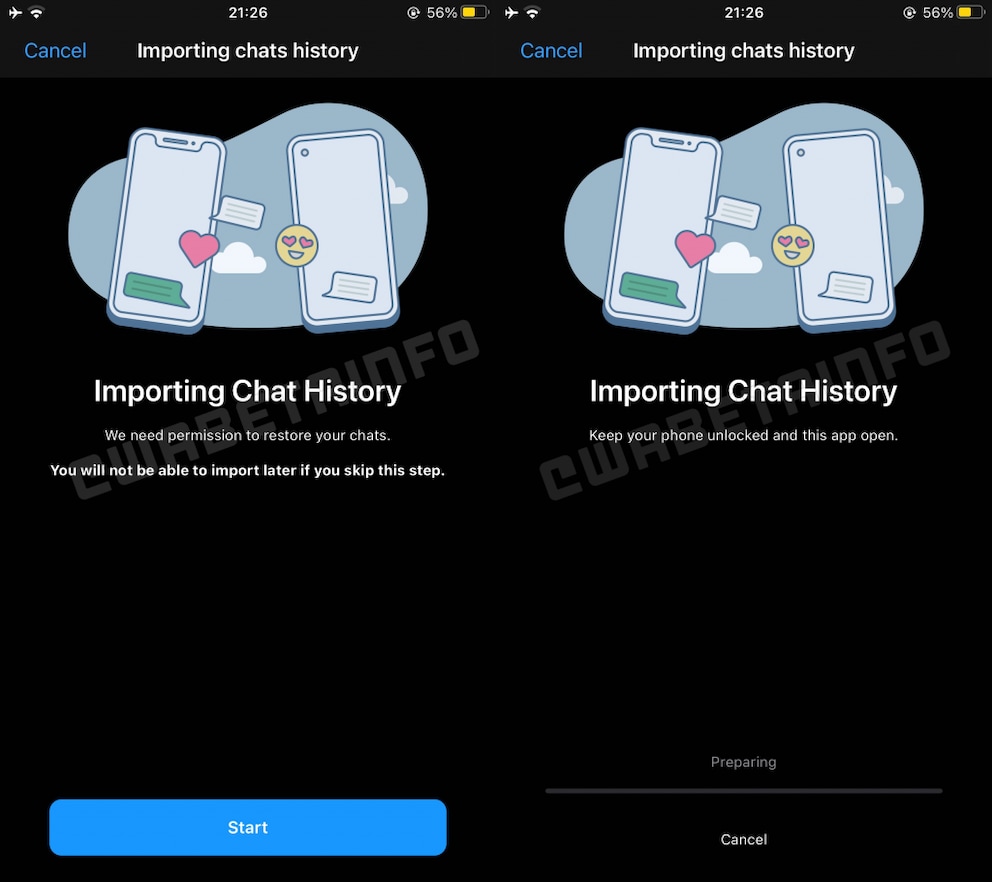
Screenshots from WABetaInfo at the time showed how the import of chat histories in WhatsApp for iOS should look. The appearance has not changed in the now-released function. Accordingly, the messenger asks for permission to restore the chats when setting up the iPhone. The same window also displays a warning that the transfer will not be possible afterward if users want to skip this step. The screenshots also show what the transfer process looks like. A progress bar is visible, along with a note that the smartphone must be unlocked and the app open.
How the WhatsApp Switch from Android to iOS Works
WhatsApp describes on its info page exactly how the chat transfer from Android to iOS works. The requirement is an Android device with at least version 5 and an iPhone running iOS 15.5 or newer. Both the Android smartphone and the iPhone must be on the same Wi-Fi network for the WhatsApp data transfer to work. A cable connection is not needed. However, the iPhone must not be set up, as the transfer only works during the initial setup of the device. Many users will therefore be forced to reset their iPhone before the transfer.
Once both smartphones are prepared and users have backed up WhatsApp on the Android device, they must start the “Move to iOS” app on the Android phone and follow the instructions displayed there. After the transfer, the current WhatsApp version must be installed on the iPhone. Important: Users must register with the same phone number they used for WhatsApp on Android. After registration and the first login, the chat data will be available on the iPhone.
Also interesting: Multi-device use on WhatsApp now unlocked for all users

WhatsApp Plans Free Backup Storage

How to Transfer WhatsApp Chats to a New Smartphone
Split System Made the Switch Difficult
The problem with cross-system migration of WhatsApp chats is the use of the cloud platform. While WhatsApp under Android stores backups in Google Drive, the messenger on the iPhone uses Apple’s iCloud. Since these two systems cannot communicate with each other, a detour via a cable and a separate app is required.