

June 23, 2025, 2:59 pm | Read time: 5 minutes
The meaning of common Android icons that regularly appear in the notification bar at the top of the screen is likely already known to many users. However, there are also icons that appear only rarely, and their meaning is correspondingly unfamiliar. No problem! TECHBOOK explains what each icon means.
Overview
We also provide a summary of Android icons in the video:
Correctly Assigning Android Icons
The icons that appear next to the time on the smartphone are known as status or notification icons. They provide information about the current state of a device, ongoing processes, or incoming messages. These icons appear in the status bar at the top of the smartphone screen, on both Android and iOS devices. However, they may vary slightly depending on the manufacturer and system version.
Mobile Network and Reception
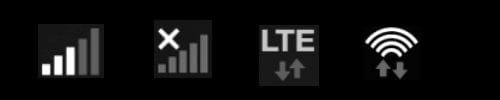
Photo: TECHBOOK
- The bar icon means that your Android smartphone is connected to a mobile network. The number of bars indicates the signal strength.
- If there is a small “x” next to the bar, there is currently no network reception. The bars can also appear as a closed icon with straight lines, filled according to the signal strength.
- The third icon indicates that mobile internet is on. At the top, it shows which mobile standard is being used, such as LTE (sometimes also referred to as 4G). Alternatively, the now common 5G symbol may appear.
- The rainbow-shaped lines with arrows indicate that the smartphone is connected to Wi-Fi.
Also interesting: How to activate emergency mode on an Android smartphone
Connection, Sound, and Location

Photo: TECHBOOK
- The cone (sometimes depicted as rainbow-shaped lines, as seen above) with the exclamation mark means that Wi-Fi is connected, but there is no internet access.
- The “B” indicates that Bluetooth is activated. The transmission standard was named after Danish King Harald Bluetooth, who lived in the 10th century.
- The speaker icon with the “x” shows that your Android smartphone is in “silent” mode–and will not make any sounds when someone calls or sends a message.
- The pinhead symbolizes active location tracking. Apps like Google Maps can then access your location.
- The curved “N” symbol stands for NFC (Near Field Communication). When this function is activated, data can be transferred wirelessly over short distances–such as when making contactless payments with the smartphone.
SIM Card, Screenshot, Update, Alarm, and Calls
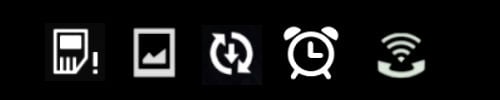
Photo: TECHBOOK
- The small card with the exclamation mark simply means that no SIM card is inserted or the smartphone cannot find it.
- The icon with the photo indicates that a screenshot has been taken.
- The two circling arrows with the downward arrow mean that a new system update is available.
- The alarm clock icon indicates that it is active and will ring at the set time.
- The phone receiver with rainbow-shaped lines/cone means that Wi-Fi Calling is activated. Users can then make calls over the Wi-Fi network instead of the mobile network, which can provide better reception indoors and improved call quality.
Do Not Disturb, Screenshot, SD Card, Sync, and USB

Photo: TECHBOOK
- The crossed-out circle means that the “Do Not Disturb” mode is activated. This can be customized: either mute everything or allow only certain people, alarms, and reminders to disturb.
- The exclamation mark on the image indicates that a screenshot could not be taken–for example, because the storage is full or the app blocks screenshots.
- The small memory card means that Android has detected an inserted SD card.
- The two circling arrows mean that data is being synchronized in the background.
- The icon with the three upward paths means that the smartphone is connected via USB to another device–such as a laptop.
Call, Modes, Battery, Mobile Network
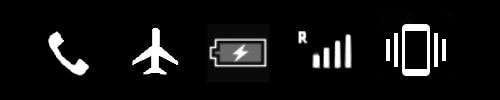
Photo: TECHBOOK
- The phone receiver symbolizes an active call.
- The airplane indicates that “airplane mode” is active–and all radio units like the mobile network or mobile internet are turned off.
- If the battery icon with a lightning bolt in the middle appears, the smartphone is currently charging.
- If an “R” appears next to the signal bars, it means the smartphone is connected to a foreign mobile network (roaming). The user can still make calls, but higher costs may apply.
- If a smartphone with small lines on the sides is visible, it means that the vibration mode is on. The phone will not ring for a call or message, but it will vibrate–sometimes noisily.
Storage, Background Usage, and Casting Function

Photo: TECHBOOK
- The filled circle indicates that the system storage is full and may need to be cleared.
- The graph shows that apps are running in the background, consuming power (only on smartphones from certain manufacturers).
- The partially filled circle with the plus sign in the middle marks reduced data usage. This setting can be changed manually.
- The screen icon and signal icon appear at the top when the casting function is activated, such as when a YouTube video is started on the smartphone and then played on the connected TV with a tap.