



January 28, 2023, 9:23 am | Read time: 3 minutes
With iOS 15, Apple introduced a new feature that significantly improves voice quality during calls on Teams, Skype, or FaceTime. However, many users are unaware of it because it is well hidden in the Control Center.
The new iPhone feature is called Voice Isolation and enhances microphone quality during a call—whether it’s a regular voice call or a video call. Apple offers it not only on its iPhones and iPads but also on Macs and MacBooks running Monterey.
Voice Isolation Hard to Find on the iPhone
The problem: Voice Isolation, or as it’s known here, Stimmisolation, is quite well hidden in the iPhone’s system, and the settings can only be accessed during a call. It’s advisable to call a friend first and make the adjustments at your leisure. Otherwise, you might find yourself in an important call while having to search through the menu to activate Voice Isolation on the iPhone.
It’s also important to know: Voice Isolation cannot be activated during regular phone calls using the iPhone’s Phone app. The mode is only available for (video) calls made through services like Microsoft Teams, Skype, FaceTime, WhatsApp, and similar.
https://oembed/techbook/affiliate/05a936996d338af763606ea7af79e919e2cf94c0b611446404dc89c991181d42/b6e44ea0-940f-43c7-93ea-971f6546c765/embed
If you are in such a call, proceed as follows:
A swipe from the top right corner down (or from the bottom up on the iPhone SE) opens the Control Center on the iPhone. On a Mac, click in the top right corner. Here you will find a button labeled “Mode,” marked by a microphone icon. The setting is set to “Standard” by default, but there are two other options called “Voice Isolation” and “Wide Spectrum.” Select Voice Isolation.
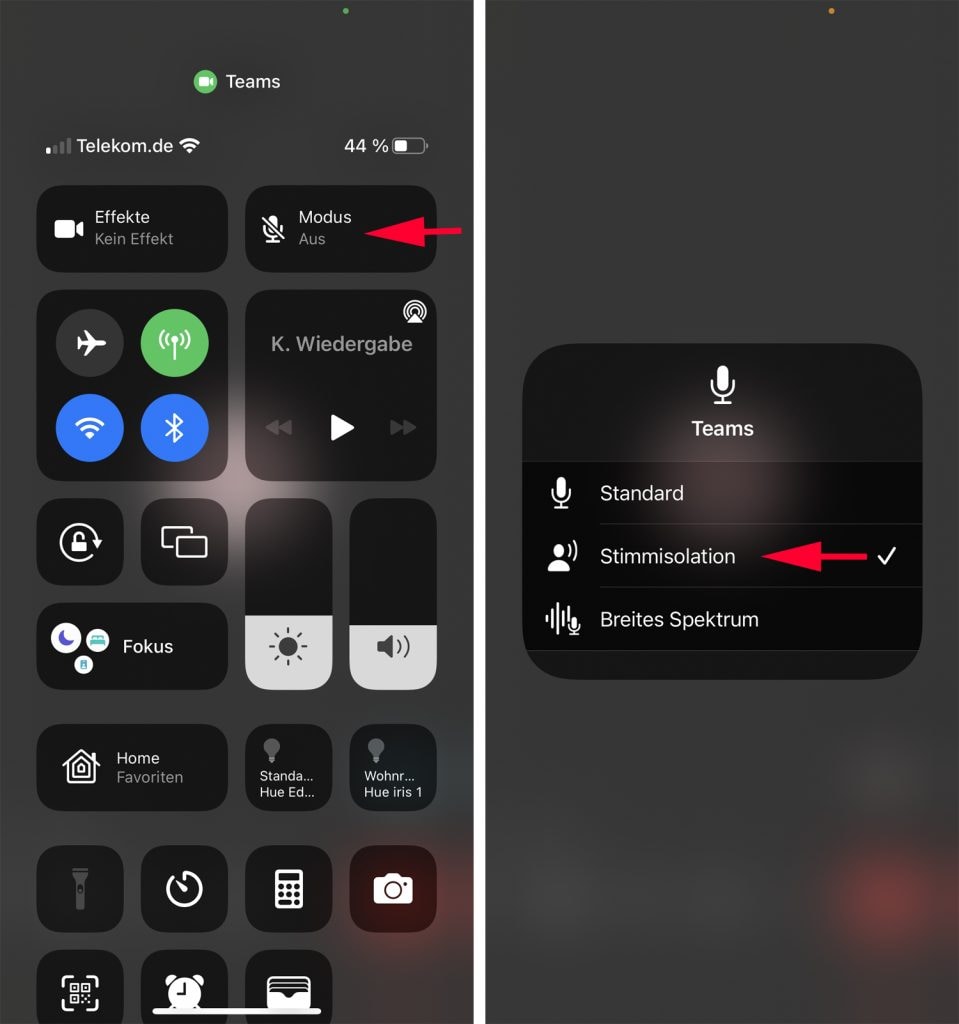
The setting activates a kind of noise canceling for the voice. Thanks to it, the microphones in the iPhone filter out all disturbing background noises during the conversation. As a result, the caller’s voice is even clearer.
Voice Isolation Not Usable with All iPhones
Voice Isolation is part of the update to iOS 15. But as the website Techradar reports, the feature is not available on all older iPhones, even though they run the current iOS version. For example, Voice Isolation does not appear at all on the iPhone 7 with iOS 15. Even on an iPhone 11, the option was visible but displayed as “not available.”
Also read: WhatsApp will soon stop working on these iPhones
On newer models like the iPhone 12 or 13, Voice Isolation should work without issues. We were able to test the feature with both an iPhone 13 and an iPhone SE. In both cases, we were positively surprised by the changes in voice transmission.