


March 5, 2026, 7:25 pm | Read time: 3 minutes
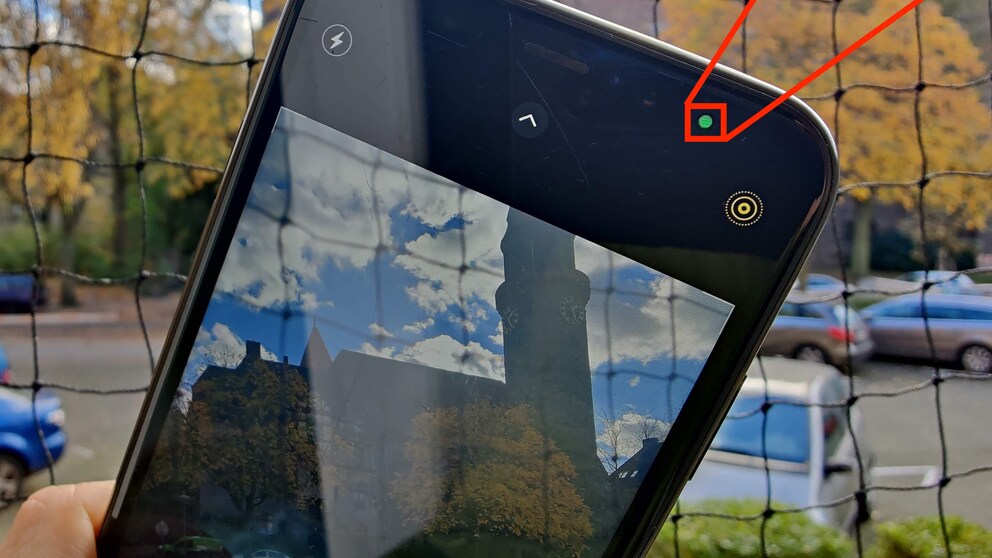
Since the update to iOS 14, a small dot sometimes appears on the iPhone screen, glowing either green or orange. TECHBOOK explains what this means.
In the past, there were repeated controversies with apps that accessed iPhone microphones and cameras and activated them without users noticing. To prevent this, Apple implemented a simple yet effective measure with iOS 14.
No More Secret Spying
When one of the iPhone cameras or a microphone is in use, a small, circular indicator now appears at the top right of the screen. This allows users to immediately notice if an app is secretly accessing sensitive functions without permission. The dot appears green on the iPhone display when the camera is active and orange when a microphone is in use.


With newer iOS versions—currently iOS 18—the feature has been further expanded. Swiping down from the top right corner to open the Control Center now shows which app last accessed the camera or microphone. Users can directly see which service has used the sensors.
Additionally, since iOS 15, Apple has offered the so-called “App Privacy Report.” In the settings, users can see in detail how often apps have accessed the camera, microphone, location, or contacts. This transparency feature has been further refined in subsequent iOS versions.

Android 16 Warns of Secret Location Access

How Easily Your Smartphone Can Be Spied On
Feature Known from MacBooks
Apple is implementing on the iPhone what has been standard on many laptops, including MacBooks, for years. There, a green dot also appears to signal to users that the camera is currently on.
The display on the Mac has also been expanded: In addition to the camera, the use of the microphone is now indicated by a colored indicator, similar to the iPhone.
What’s the Status with Android?
Google introduced a similar system with Android 12. Since then, a green indicator also appears at the top of the screen on Android smartphones when the camera or microphone is active.
Also, since Android 12, there is a “Privacy Dashboard.” Users can see which apps have accessed sensitive permissions like the camera, microphone, or location in the past 24 hours. With Android 13, additional control options were added, such as separate permissions for photos and videos instead of general storage access. With Android 14, privacy overviews were further refined, and transparency for sensitive permissions was expanded.
In recent years, both Apple and Google have significantly focused their mobile operating systems on transparency and control over camera and microphone access. While secret activations cannot be completely ruled out technically, users can now notice them much more quickly than a few years ago.