


March 18, 2021, 4:14 pm | Read time: 13 minutes
For years, GoPro has been the leader in the action cam market. But drone manufacturer DJI offers a camera that poses serious competition to GoPro. We compare the GoPro Hero 8 and the DJI Osmo Action.
Although GoPro has already released the Hero 9 as a successor, the Hero 8 remains a good alternative due to its lower price. We compared the GoPro with the DJI Osmo Action, which aims to impress with similarly good electronic stabilization and other features.
Overview
How TECHBOOK Tested
The cameras underwent field testing with a particular focus on video quality and stabilization. Both cams are advertised with electronic stabilization that is supposed to make special motorized mounts unnecessary. Operation, screen readability, build quality, and battery life were also considered.
1. Screen and Operation
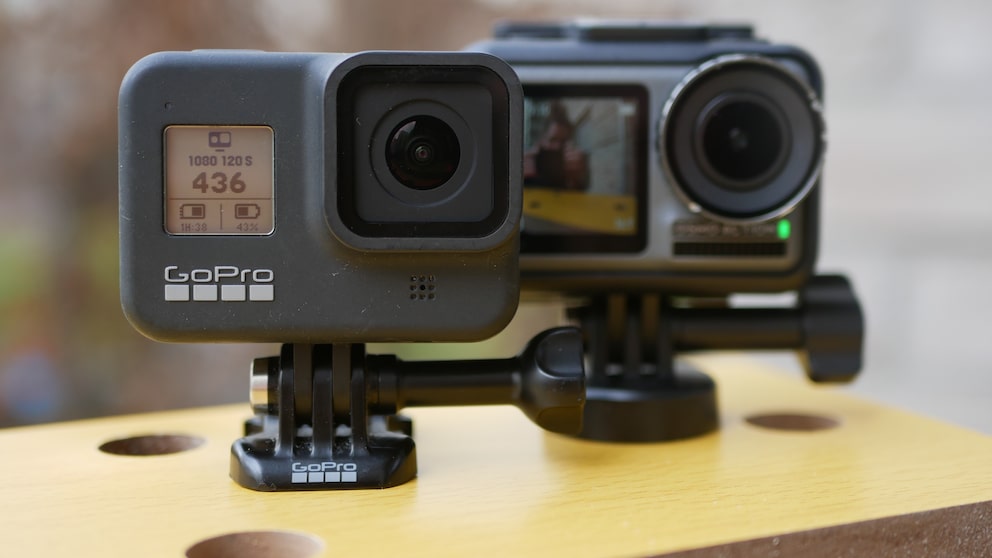
Externally, the GoPro Hero 8 is hardly different from the Hero 7. The screens on both the front and back remain unchanged: a 1-inch monochrome display on the front and a 2-inch touchscreen on the back. The Osmo Action steps it up with a 2.25-inch touchscreen on the back and a 1.4-inch color front screen that can mirror the image. Simply double-tap the touchscreen with two fingers, and the camera switches between screens. This is practical when you need to position the camera precisely and see yourself in the frame.
Operation is also significantly smoother than with the GoPro–the menus respond better to touch, and everything feels more fluid. Playing back recorded videos on the GoPro is especially cumbersome. You can’t simply fast-forward or rewind; you have to awkwardly press a button to display the slider, and even then, scrubbing is very jerky. With the Osmo Action, the slider is always visible and very responsive–this is how operation on a small screen should work.
2. Video Quality and Stabilization
GoPros have long been considered the best action cams on the market in terms of video quality. The manufacturer manages to pack excellent sharpness and color reproduction into a very small housing. While DJI is not as well-versed in action cams, it is a pioneer in the drone market with its 4K cameras. The DJI Osmo Action actually comes very close to the image quality of the Hero 8, but only with stabilization turned off. Additionally, the Osmo Action supports HDR video recording, making colors more natural and vibrant. With HDR, the overall image is better than the Hero 8, which, however, has better default color reproduction. HDR recording is also only possible up to 4K at 30 frames per second (FPS) instead of 60 FPS. Both cameras offer users manual settings like exposure and shutter speed, but the GoPro has additional options with the “Protune” function, such as different color profiles.
Also interesting: The significance of HDR in smartphone cameras
Video Formats
With the GoPro, you can set the camera’s field of view yourself, with options depending on resolution and FPS, including wide, linear, medium, narrow, and the very wide “Superview.” The wider the field of view, the more the GoPro can capture, with Superview providing a dramatic effect. The DJI does not have this setting option; here, the field of view is determined by the chosen resolution and frame rate. However, there is the option to de-warp the images, which eliminates the “fisheye” effect typical of action cams. This minimizes image distortions, which is especially useful for non-action shots. The linear field of view of the GoPro, which is also intended to reduce distortion, cannot compete with this. As a nice extra, the GoPro allows digital zooming at certain resolutions, which is not possible with the DJI.
The GoPro records videos in higher resolution with the H.265 codec (HEVC), while the DJI captures all videos with the older H.264 (AVC). The advantage of HEVC is better compression, which means the GoPro’s videos are sometimes only half the size of the DJI’s–with the same quality. The downside is limited compatibility, as older computers and smartphones often struggle with the new codec.
No More Gimbal Needed
Both cameras feature what is known as “Electronic Image Stabilization” (EIS). GoPro was the first camera to launch with next-generation stabilization in 2018. Until then, a three-axis gimbal was necessary for this level of stabilization–a mount that uses three motors to counteract jerky camera movements. GoPro calls this technology, which achieves gimbal-like stabilization electronically, “Hypersmooth.”
Stabilization comparison: GoPro on the left, DJI on the right
In May 2019, the Chinese manufacturer DJI, known for its high-end drones, surprised with a real competitor to GoPro: the Osmo Action. DJI already manufactures sophisticated gimbal systems for its drone cameras and also offers a mini gimbal camera with the Osmo Pocket. However, the Osmo Action relies entirely on electronic image stabilization and is the only other action cam on the market that can compete with the GoPro in this category. DJI calls its stabilization technology “Rocksteady”–rock solid.
While Hypersmooth is available on the GoPro Hero 8 at every resolution and frame rate, Rocksteady only works with certain settings. Both cams support 4K at 60 FPS. However, Rocksteady on the Osmo Action is limited to a maximum of 60 FPS in 2.7K and 1080p. The Hero 8 can easily stabilize 2.7K at 120 FPS and 1080p at 240 FPS.
Available Resolutions:
How Good Is the Stabilization?
At first glance, it seems that DJI is indeed challenging GoPro’s position as the top dog in terms of stabilization. Side by side, the footage on both cameras appears buttery smooth, with small bumps and even larger movements being extremely well compensated. However, upon closer inspection, it becomes clear that GoPro still has a significant edge with its Hypersmooth technology. EIS works only by cropping parts of the image edges, which leads to a reduction in the field of view. The GoPro cuts only about 9 percent of the field of view at 4K with 60 FPS, while the DJI cuts a full 22 percent. Therefore, DJI has to cut significantly larger portions to achieve the same level of stabilization. However, DJI can compensate for larger shocks slightly better, although the GoPro has the upper hand with smaller shakes, as can be seen in the comparison video.
Stabilization Comparison: GoPro on the left, DJI on the right
While in the direct comparison with the DJI you can only see the tips of the feet in the image, the GoPro shows the entire foot and part of the leg. Also, nothing of the hand is visible with the DJI, while the larger field of view of the GoPro still captures it.
Additionally, EIS on the DJI results in a slight loss of image quality, making the videos a bit grainier than those from the GoPro. The GoPro, on the other hand, maintains roughly the same level of sharpness even with active Hypersmooth. As can be clearly seen in our sample images, the picture on the Hero 8 remains sharper overall, and the colors appear less faded.
3. Build and Design
GoPro cameras are popular with users due to their high durability. Since the Hero 5, the cameras have been waterproof without a case, allowing for dives up to 33 feet deep. The Osmo Action is also very well built, and DJI even goes a step further with a depth of 36 feet, although this is more of a PR stunt. Perhaps a diver can capture a slightly deeper coral with the extra foot on the DJI, but in the end, the difference is too marginal to really matter.
Interchangeable Filters and Mount
The easily removable filter on the DJI is practical, as it can be unscrewed and replaced with other ND filters. GoPro removed this feature with the Hero 8 but fortunately brought it back with the Hero 9. So, if you want to use special filters or simply replace the glass, you should opt for the Osmo Action, Hero 7, or Hero 9.
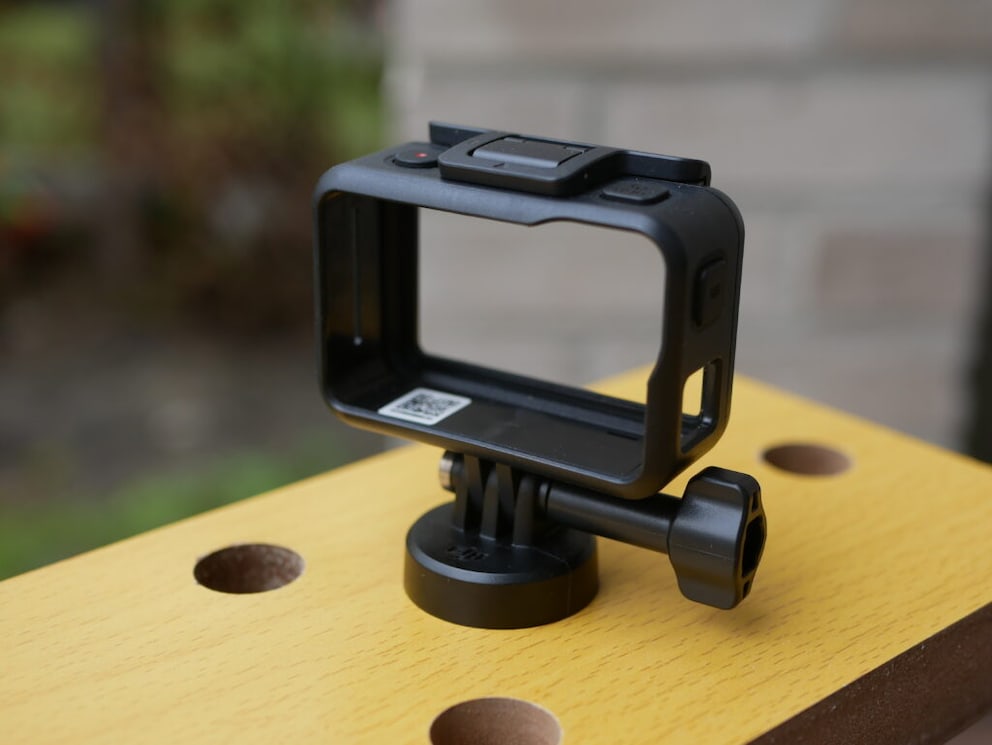
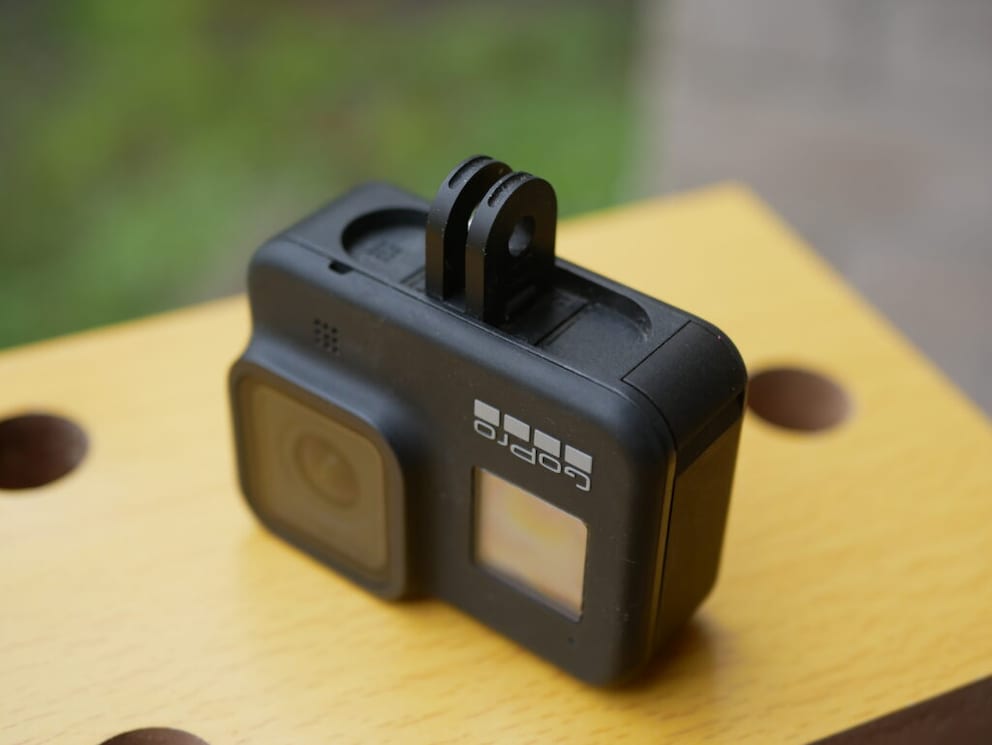
While the Osmo Action has a plastic frame for attaching accessories, GoPro offers a more practical solution. The Hero 8’s housing integrates two folding feet that fit standard GoPro accessories, eliminating the need for a frame. Speaking of accessories: GoPro offers a wide range of accessories from both GoPro and third-party manufacturers, while DJI has not yet matched this range.
Connectivity Options
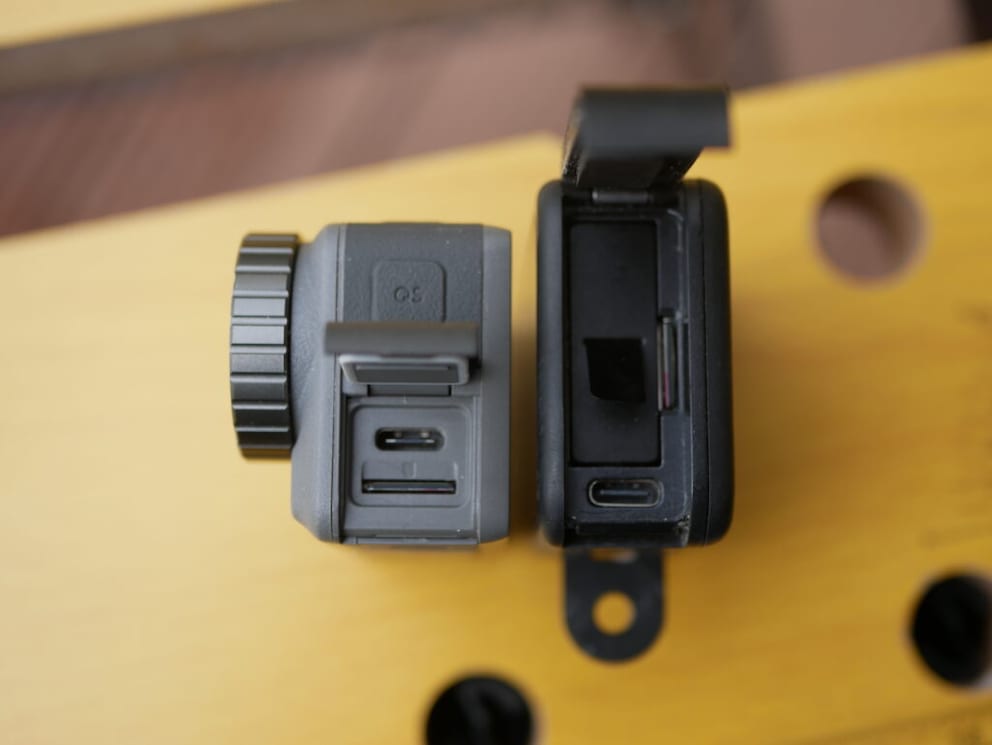
The side flap on both action cams is practical, with the GoPro housing the USB-C port, memory card slot, and battery. The DJI only has the USB-C port and memory card here. The flaps can be easily removed on both models to expose the ports. There is also a corresponding cutout in the Osmo Action’s frame, allowing charging even with the mount. However, note that this compromises water resistance.
The Hero 8 is the first GoPro that can be expanded with so-called “Mods,” which attach to the USB-C port. Options include a directional microphone that also serves as a slot for additional mods. A LED light and a flip display can be attached to it. The display can face forward so vloggers can see themselves while filming.
Battery Life
The GoPro’s battery has remained the same size since the Hero 5. The same battery dimensions also mean the same capacity: 1,220 milliampere-hours (mAh). The only difference from the Hero 5, 6, and 7 batteries is the slightly higher load capacity, which enables Hypersmooth Boost. The Hero 8’s batteries have a blue frame to distinguish them from older models. However, the old batteries still fit into the Hero 8’s housing. The Osmo Action comes with a significantly larger battery pack, which also has a slightly higher capacity at 1,300 mAh.
DJI uses an unusual solution for the battery: Two small sliders release the battery, which pops out of the housing with its cover. The cover is firmly attached to the battery and fits flush with the housing. Therefore, replacement batteries for the DJI all have their own cover. While we’re not sure this solution is simpler than GoPro’s, the spring mechanism that pushes the battery out of the housing makes a good impression.
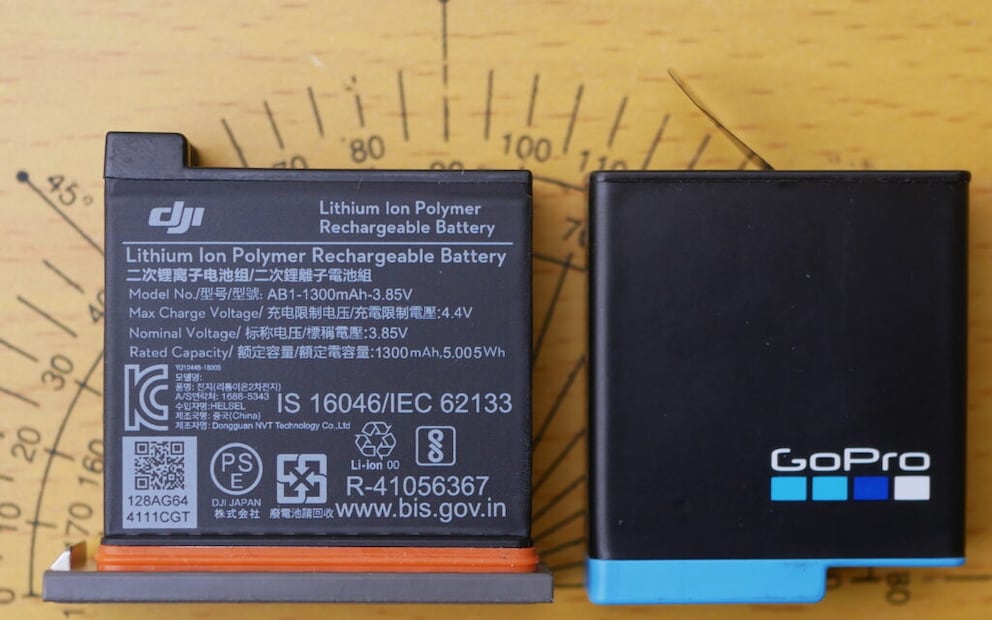
In the test, it was confirmed that the GoPro is mainly hindered by its too-small battery. After a two-hour training session, the DJI still had 22 percent charge left, while the GoPro was already down to 8 percent. Additionally, the GoPro occasionally ran a bit warm, which naturally consumed more battery. It can also happen that the Hero 8 simply shuts off in winter cold, despite having enough battery. This does not happen with the Osmo Action, based on our experience.
4. Additional Features
Besides videos, action cams today need to do many other things. Neither GoPro nor DJI has skimped on the features of their cameras. Both support time-lapse functionality, both as video and as a series of images, with the interval between images freely adjustable. However, the GoPro also offers “Timewarp” technology, which records time-lapse videos with stabilization. Therefore, the camera does not need to be stationary or in a gimbal for smooth recordings. DJI has since released an update that brings a similar feature called “Hyperlapse” to the Osmo Action.
Both cameras have “Custom Modes”–menu-accessible setting profiles for video and photo. This is particularly practical if you often film in different situations and want to quickly and easily access the right mode with the correct image settings. The Osmo Action also has a dedicated slow-motion mode with up to 8x slowdown. In principle, a 1080p or 720p video is simply recorded at 240 FPS and then slowed down to 30 FPS. The same effect can also be achieved in post-processing on a computer or smartphone. Apple’s Photos app and Google Photos, for example, can recognize when a video was recorded at 240 FPS and offer extended slow-motion settings.
Both the GoPro and DJI take photos in 12-megapixel resolution. The Osmo Action can save photos in .jpeg and .raw formats and also has a manual mode for settings like exposure and aperture. In photo mode, the de-warp function is also available for more natural-looking photos. The GoPro records in .jpeg and its own GoPro format .gpr. To reduce distortion, you can also switch from the wide options to the linear option. GoPro’s Protune is also available for photos, offering significantly more settings than DJI.
The GoPro has GPS and can stream videos directly to YouTube via a Wi-Fi connection. Both cameras can be controlled by voice.
DJI vs. GoPro – Conclusion
GoPro has long been the undisputed leader in the action cam market. While DJI doesn’t quite take the crown with the Osmo Action, it does put pressure on GoPro. DJI has significantly improved its cam with continuous updates and new features. The operation of the Osmo Action is excellent and smooth. The practical color screen on the front has put so much pressure on GoPro that the Hero 9 now also features it. The Osmo Action also leads in battery life. GoPro struggles to get a handle on the high energy consumption of its cameras, which is especially annoying in winter when the camera simply shuts off.
In two areas that are probably the most important for an action cam, DJI cannot beat GoPro: video quality and stabilization. Videos with the Hero 8 are sharper, more color-accurate, and better lit. With Hypersmooth, the Hero 8 is far ahead of the Osmo Action. Although the Osmo Action cuts more of the image, it cannot match the buttery-smooth footage of the GoPro.
So, those who primarily focus on video stabilization should opt for the GoPro Hero 8 or its successor, the Hero 9. The Osmo Action might be an option for those who vlog or frequently record themselves and don’t always need stabilization. Thanks to the front screen, the Osmo Action is ideally suited for this purpose.