


December 3, 2025, 3:18 pm | Read time: 2 minutes
If you own a Fritzbox, you can measure your internet speed for uploads and downloads precisely—without a speed test. TECHBOOK reveals the hidden menu in the router.
Internet providers often promise a certain internet speed. However, users frequently experience different speeds. If you want to know how fast your internet connection really is and whether the bandwidth specified in your contract is available, you can easily find out through the Fritzbox. The router displays the current upload and download speeds without an external speed test. TECHBOOK’s editorial director, Rita Deutschbein, explains where to find the setting.
Find Internet Speed via Fritzbox
If you want to read your actual internet speed at a specific time via the Fritzbox, proceed as follows:
It’s important that the Fritzbox is connected to the internet within the home network when you want to read the speed. While it doesn’t matter whether the connection is via cable or Wi-Fi, the wired solution is more accurate as it is less prone to loss. To access the router menu, users must enter the URL https://fritz.box in their browser. Alternatively, you can reach the Fritzbox at the IP address 192.168.178.1, which you must enter directly into the browser’s address bar.
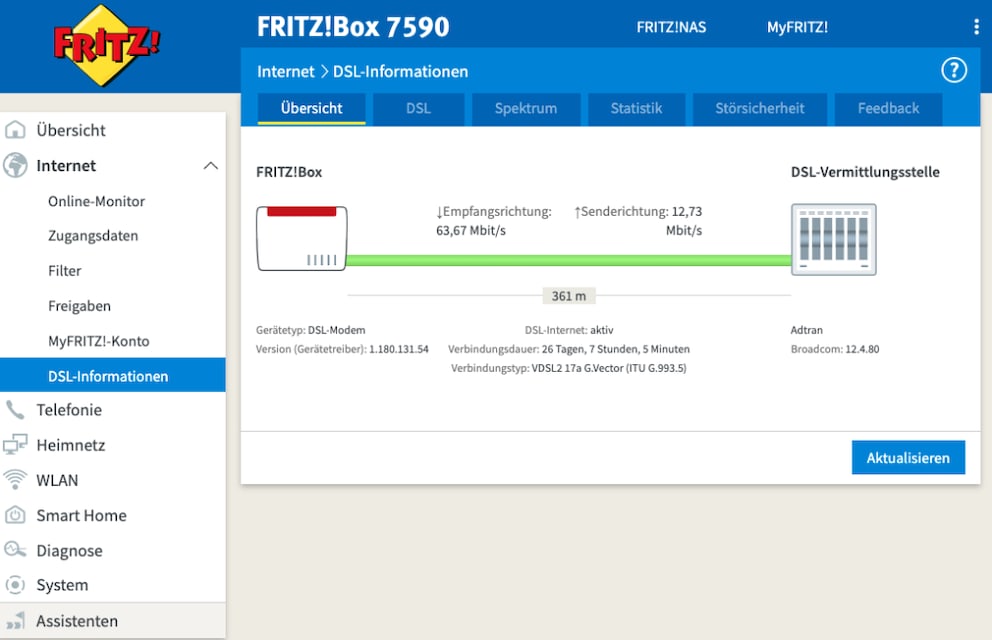
The Fritzbox menu’s homepage opens, where users log in with their username and password. After logging in, click on “Internet” in the left menu. Then click on “DSL Information.” The following window in the Fritzbox menu appears, where you can read the current internet speed:
What Lies Behind the Different Values
In this view, the Fritzbox documents the current connection to the DSL exchange. The reception direction shows the downstream speed, while the transmission direction indicates the upstream data transfer. The displayed speed is the maximum possible between the exchange and the internet connection.
However, the contract booked by the user may include a corresponding throttle, such as 50 megabits per second (Mbps). If the maximum achievable data rate is lower than agreed in the contract, users should contact their internet provider. With the amendment of the TKG in December 2021, you have the right to reduce the monthly basic fee if the bandwidth is too low.